AbleComm: Panasonic phone systems & phones
KX-TAW848 installation guide

© 2004 AbleComm, Inc.  All Rights Reserved. taw848.htm 3/16/04
Email  Newsletter  AbleComm.com Home  AbleComm.info Home
Call  toll-free, 1 888 ABLE 999    ORDER ONLINE


  • This page was started on 1/17/04, before the KX-TAW848 became available in the USA.
  • Information here is preliminary and may not be 100% accurate -- we update this page as we learn more.
  • Most recent update was on 3/16/04.
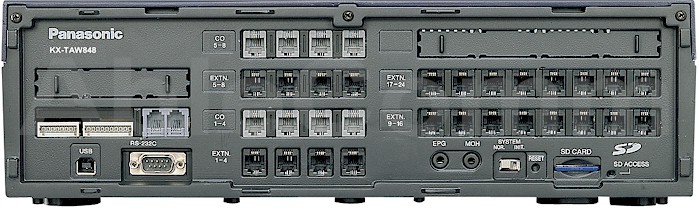
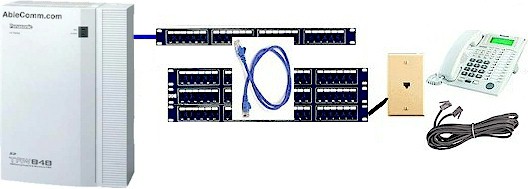
  • Photos on this page are for guidance only. The real KX-TAW848 is off-white, not dark gray as shown above.
  • The unit comes with adhesive labels to mount near the jacks. They are not identical to the labels in the photos.
CONTENTS:
Mounting your KX-TAW848 Connecting to the phone company Configuring your system
Getting dialtone into your system Connecting your phones Connecting your door intercom
Connecting your voice processor Programming your KX-TAW848 Connecting your wireless phones
Connecting door strikes Connecting an electric gate opener Surge protection and backup power
Using a punchdown tool Wire, cable and jacks What's involved in installing
a phone system
Connecting a paging system, background music, and music on hold
   
 
  • The KX-TAW848 can handle up to 8 lines and 51 phones (but they can't all be in use at the same time).
  • The connection panel in the KX-TAW848 has spaces for four 4-port modules, and two 8-port modules.
  • There is also a space for the door intercom/opener module, and spaces that may be used for other modules in the future.
  • There are mounting locations inside the cabinet for modules that do not need ports for external connections.
  • The KX-TAW848 is equipped with two 4-port modules.
    1. One module, which can't be removed, can handle up to four multi-line or single-line phones.
    2. The other is the KX-TAW8480, which can handle up to 4 phone lines ("CO lines").
     
  1. If you want to add more lines, you need a KX-TAW84880 module (4 ports).
  2. If you want to add more multi-line phones, you can use the KX-TAW84870 (4 ports) or KX-TAW84875 (4 ports) or KX-TAW84876 (8 ports)
  3. If you want to add more single-line phones you can use the KX-TAW84870 module (4 ports) or
    KX-TAW84874 (8 ports).
  4. If you want to have door intercom speakers and/or remote unlocking, you need the KX-TAW84861 module.
  • DSS/BLF consoles can connect to the KX-TAW84875 module (4 ports) or KX-TAW84870 (4 ports) or KX-TAW84876 (8 ports) or the 4-port module that is permanently installed.
  • Voice Processors can connect to the KX-TAW84875 module (4 ports) or KX-TAW84870 (4 ports) or KX-TAW84876 (8 ports) or the 4-port module that is permanently installed.
  • 28 of the phones could be wireless (of which up to eight could be in use at one time, through four cell stations). They can connect to the KX-TAW84875 module (4 ports) or KX-TAW84870 (4 ports) or KX-TAW84876 (8 ports) or the 4-port module that is permanently installed.
    • Since the KX-TAW848 has modular connections, installation is “plug and play.”  The design allows people with an existing Panasonic phone system, like the KX-TA624 or KX-T616, to easily upgrade for all the new features and greater capacity of a KX-TAW848. Simply unplug the line cords from the previous control unit and plug them into a KX-TAW848. The existing telephones and cabling stay in place, providing considerable savings in time and money.
    • Intercom numbers start with 101.
    Mounting your KX-TAW848
    The KX-TAW848 measures about 10-3/4"W x 14-3/4"H x 4-1/2"D. It can be mounted on a wall, placed on a shelf, or mounted in a rack or wall bracket.

    For wall-mounting, we recommend a piece of 5/8" or 7/8" thick plywood, about 2' by 4'. Make sure you have enough space for jacks, punchdown blocks, surge protectors, music on hold source, voice processor, etc. Try to mount the plywood so the center is at eye-level, with the wood panel horizontal. If possible, use an electrical outlet on a circuit that's dedicated for phone equipment use.

    If you are replacing another phone system with compatible wiring, such as a Panasonic KX-T61610 or KX-TA624, put identification tags on the cords before unplugging them, so they can go into the right jacks in the 848.
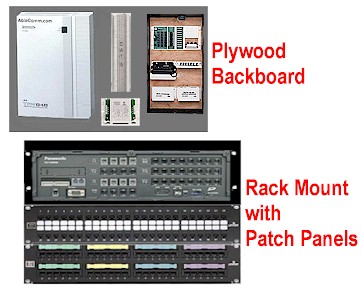
     
    The inner connection panel of the 848 looks like a patch panel, and is sized just right for rack mounting. AbleComm has a rack mount for it. CLICK

    Connecting to the Phone Company

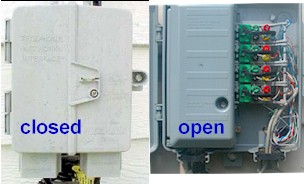
    The phone company's responsibility usually ends at a demarcation point ("demark" or "Standard Network Interface" or "Network Interface Device") located on an exterior wall, or inside near your phone equipment. Some demarks have built-in protection against high voltage surges. Some don't. Even if your demark is protected, we recommend adding additional surge protection on the phone lines, and on the AC power.

    There are many different types of demarks. Here are some of the most common ones:


    This interface housing may be installed indoors or out, and can handle up to six lines with the installation of line circuit modules.

    There are different versions available, and you may have a choice of plugging in or using screw terminals to connect your wires to the phone company's circuits.

    There are usually two internal compartments. One is reserved for phone company technicians, and requires a special "can wrench" to open.

    The RJ21X network interface is installed indoors, usually near your phone equipment, and can carry up to 25 phone lines.

    It's based on a 66M punchdown block, with an attached female 25-pair Amphenol-type connector, and usually has a protective cover.

    You can connect to it by plugging a 25-pair cable or a hydra adapter into the connector, or punching down your wires with a punchdown tool.


    This demark, sometimes called an "NW1," is always installed indoors, and can handle one or two lines.

    It's a modification of a  standard phone jack, with a rotating protective cover and a silver label that explains how to make a test.

    There is no surge protection, but there may be an internal circuit that allows the phone company to make tests from the Central Office.

     
    Getting dial tone into your phone system
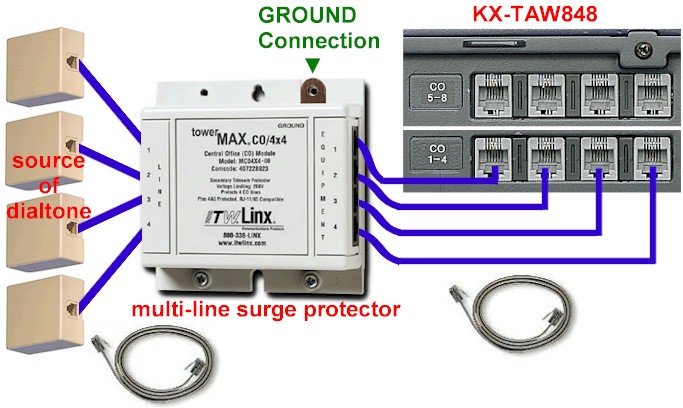
    • The KX-TAW848 control unit connects to the phone company's circuits through its internal one-line modular jacks. The jacks are labeled "CO," which stands for "Central Office." For more telecom terminology, CLICK.
    • You will need nearby one-line ("RJ-11C") jacks, which can be installed by the phone company or anyone else.
    • It's also possible for the phone company to provide NW1 demarks near your equipment, that you can plug into.
    • You'll need several modular line cords (one-pair or two-pair cords are fine) to go from the external jacks to the surge protector, and to go from the surge protector to the jacks inside the control unit.
    • The KX-TAW848 is initially configured to handle four phone lines, and can be expanded to handle eight lines.
     
    Connecting your phones
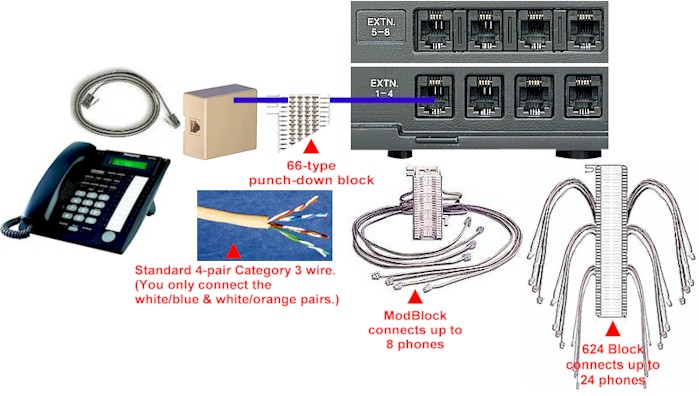
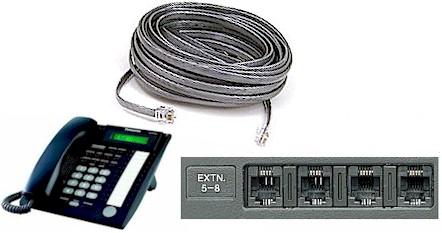
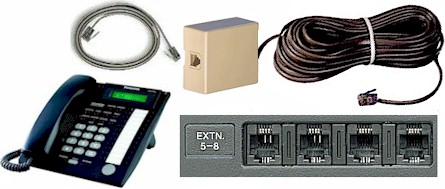
    • Your phones will connect to modular jacks (labeled "EXTN." for "extension") inside the KX-TAW848 cabinet, either directly, or via a punchdown block, patch panel or other hardware.
    • AbleComm's "ModBlock" is a 66-type punchdown block, equipped with 8 cords, that can plug into the phone jacks inside the 848. The ModBlock can also be used for connecting the phone company lines, and door intercom circuits.
    • If your system has been expanded, you can use several ModBlocks for more than 8 phones, or use our 624 Block for up to 24 phones. Like the ModBlock, the 624 Block can also be used for connecting the phone company lines, and door intercom circuits.
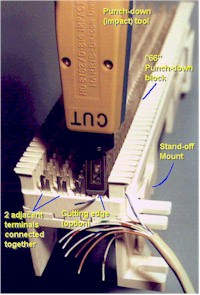
    • Plug the cords form the ModBlock or 624 Block into the 848, and use a "punchdown tool" to attach the wires from the phone jacks to the block. We sell punchdown tools. (See below)  It will take you about five minutes to learn how to use one.

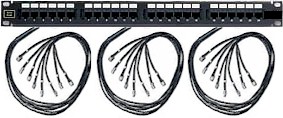
    You can use patch panels instead of (or in addition to) punchdown blocks.

    They're more expensive than punchdown blocks, but they make it easy to make and change connections, and to diagnose and solve problems.

    • A patch panel is particularly convenient when someone changes offices (or a kid changes bedrooms). Just move the phone and the patch cord, and he or she will have the same intercom number, voicemail box and features in the new location.

    • It's also good if you want to have more jacks installed than you can have "live" at one time.

     
    AbleComm's exclusive PanaPatch 6 has 24 modular cords that can plug right into the jacks in your KX-TAW848.

    CLICK to see the patch panels, racks, brackets and accessories at our PhoneGeeks.com site. 


    If you want a quick installation without specialized tools or hardware, you can simply use long telephone cords.

    This is good for temporary installations at fundraisers and political campaigns.

    The professionals may sneer at you, but it will work.

    • Try not to trip over the wires!


    If you don't mind running wire, but don't want to get involved with punchdown tools, blocks, or patch panels, you can simply attach wire to your phone jacks, crimp a plug on the other end, and plug into the KX-TAW848.


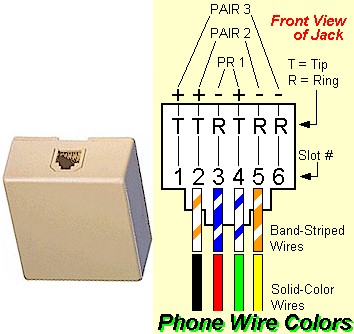
    Multi-line proprietary phones, such as the KX-T7730 and KX-TD7895, need 2-pair wiring and jacks.

    Single-line phones and accessories, such as credit card terminals and fax machines, use 1-pair wiring and jacks.

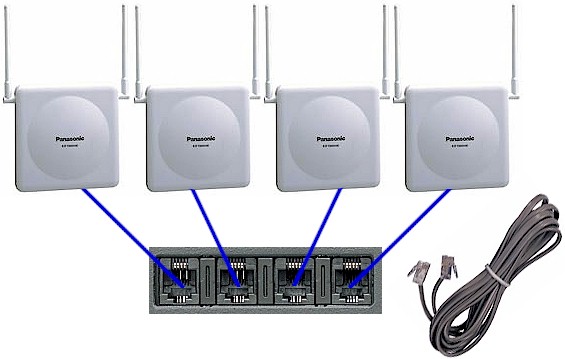
    The wireless phone antenna modules use one pair wiring, but they use pins 2 and 5 in their phone jacks instead of the more common pins 3 and 4.

    (Diagram is from Leviton.)


    Connecting your Voice Processor


    There are several Panasonic voice processing systems ("voice processors"). Each one mounts on the wall, and connects to your Panasonic KX-TAW848 phone system control unit like phones are connected.

    You'll need modular line cord(s) to run from the jack(s) inside the voice processor cabinets to the jack(s) inside the KX-TAW848.

    When connected to a Panasonic KX-TAW848 phone system, one phone cord is capable of carrying two simultaneous conversations between the voice processor and phone system.

    This "DPITS" technology makes efficient use of your phone system's resources: one phone system port can handle two voice processor ports.

    Make sure you make connections with a phone cord that has a DATA PAIR -- the yellow and black wires in a normal cord and phone jack. A cord with just two wires in the center positions will NOT work.
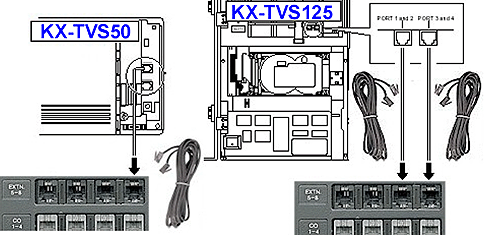
    • Two-Port voice processors, such as the KX-TVS50 and 90, use one phone cord plugged into your KX-TAW848 to support two ports, for two simultaneous conversations.

    • Bigger voice processors, such as the KX-TVS125, use one cord for each two ports. If you have four ports, you'll need two cords plugged into the KX-TAW848.

  • The KX-TAW848 can support up to four voice processor ports with digital integration, and more ports with DTMF integration.

  • TIP: Instead of mounting your voice processor next to the phone system control unit, you can mount it near one of your computers, so it's easy to make programming changes, and more comfortable than working in the phone equipment closet.
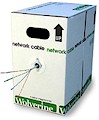
    It won't take up much space, and the wiring is very simple -- much simpler than extending a serial cable 50 feet.


    Connecting your Wireless Phones

    • The KX-T0141 antenna modules ("mini cells) used with KX-TD7680 and 7690 wireless phones connect to KX-TAW84870 (4 ports) or KX-TAW84875  (4 ports) or KX-TAW84876 (8 ports) or the 4-port module permanently installed inside your KX-TAW848 control unit.

    • No power is needed at the antenna modules.

    • Up to 28 handsets can be registered for use with the KX-TAW848; but only two can be in use with each antenna at one time.

    • Maximum distance from the phone system control unit to an antenna module is 1138 feet with 24 gage wire, and 1640 feet with 22 gage.
    • You should be able to use a handset up to 500-600 feet from an antenna module. Range depends on environmental conditions.
     

    Programming your KX-TAW848

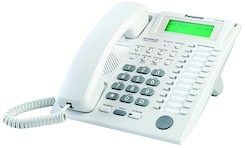
    The KX-TAW848 phone system can be programmed with a display phone, so you should order at least one.
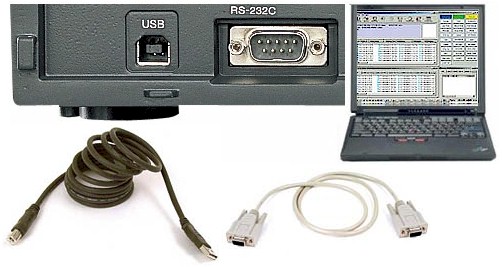
    (If you are going to have Caller ID, you'll probably want lots of display phones. The KX-T7735 is the best choice, because its 3-line display can show the caller's name and number simultaneously.)
     

    The KX-TAW848 control unit can be programmed with an IBM-compatible PC.
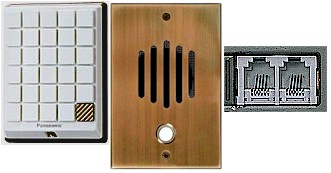
    You'll need our ProCable-9, or a serial cable and null-modem adapter from Radio Shack, or a USB cable.


    Connecting your door intercom speakers

    The KX-TAW84861 door intercom circuit module operates up to four door speakers. Each door intercom speaker requires one pair of wires.

    • In addition to speaking to visitors, you can dial a code on a phone, or press a programmed button, to unlock doors equipped with electric door strikes, or to perform other remote control functions such as turning on lights or music.

    • You can re-use existing doorbell wire if you remove the button, disconnect the transformer, and splice some wires in the chime housing.

    • We have a variety of door intercom speakers, in plastic and metal, including models with video cameras. CLICK

    Connecting electric door strikes

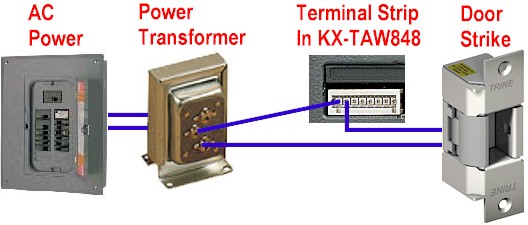
    Power for your door strike(s) loops through the KX-TAW848, connecting to the terminal strip.
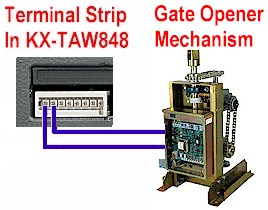
    The KX-TAW848 does not provide a source of power; it just provides a momentary switch closure. You'll have to get a transformer to provide the proper voltage for your door strike.


    Connecting an electric gate opener


    The KX-TAW848 phone system can be used to open an electrically controlled gate, if the gate opener can be activated by a momentary switch closure.

    Mechanism photo is from Eagle Access Control Systems


    Connecting a paging system, background music, and music on hold


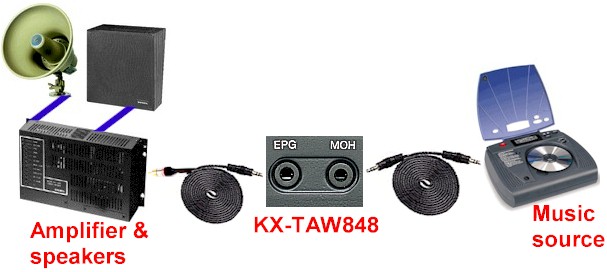
    • The KX-TAW848 has 3.5mm "mini" jacks that you can use to connect a paging system, and a source of music or message on hold.

    • If you connect a music source, it can also be used for background music through the speakers in your phones.


    punchdown tools

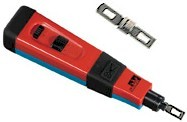
    This is a "punchdown" tool. You put a wire between teeth in a 66-block, and press the wire in with the punchdown tool. The wire gets connected, and excess wire is chopped off. It will take about five minutes to learn how to use it. Several models are available. CLICK
    The great photo at the left is from Mark Henrichs. For terrific advice on installing wiring for phones, video, audio and more, see his Website.



    Wire, cable & jacks


    The traditional 4-conductor "quad" wire with green, red, black and yellow should not be used in new phone installations.

    Use "UTP" (Unshielded Twisted Pair) wire, rated for Category 3 or higher.

    (There is no need to use Teflon insulation or other types of "plenum rated" insulation, unless your wire is going through a space between a ceiling and the floor above, and that space is used to circulate air.)

    If you are running new wire, we recommend 4-pair (8 conductor) wire, 24 gage (or "gauge") to each phone location.

    Panasonic phones don't need four pairs of wire, but it's nice to have extra pairs in the walls, for additional devices later on, or to compensate for wire damaged by plumbers or squirrels. Wire is cheap to buy. Installing more wire later on is not cheap, and can be very messy. You can buy wire locally or from us.


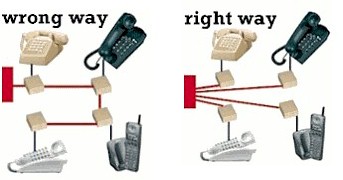
    Whether you are installing new wire or re-using existing wire, it must be in a "home-run" configuration (what computer guys call a "star topography"), with a direct path from each phone jack to the control unit. In residential construction, "loop-through" wiring is more common, where the circuit passes from one jack to another and another.
    If you have a loop-through arrangement, you can change some of the connections to reconfigure one or more jacks as home-runs.  


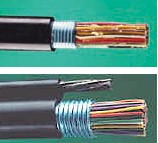
    If you need to install a phone in an adjacent building, such as a garage, we recommend that you use cable designed for burial in the ground. It's armored to protect it from sharp-toothed critters, and it's filled with anti-moisture gel.

    We also have "figure-8" cable, for suspension in the air from building to building, or pole to pole.

    CLICK for wire and cable at our PhoneGeeks.com website.


      We will give you one FREE JACK for each "system" phone ordered for a Do-It-Yourself installation -- just ask. Let us know if you want a wall jack, or either a surface-mount or flush-mount jack for a table/desk phone. Most Panasonic phones can be used horizontally or vertically.
    In addition to standard jacks in various colors, we can also provide jacks to match Leviton "Decora" outlets and switches; and plates that hold up to six jacks.

      Click to order jacks.   Click to learn more about wire & jacks

     
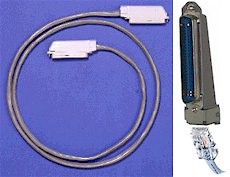
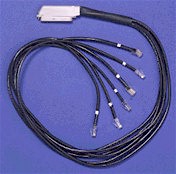
    If you are replacing an older "electromechanical" phone system that uses 25-pair cable, we can provide adapters that will allow you to easily put modular plugs into the existing "Amphenol" connectors. You can also simply cut off the connectors and attach standard modular jacks to the old cable. If you want to cut, we recommend that you cut off 20 pairs, leaving the five pairs in the "white group" of wires intact. Connect two or three pairs to the jack, and leave a few pairs of un-needed wire coiled up inside the jack for future use. It's always best to have more wire than you need. An AbleComm Hydra adapter has an Amphenol-type connector and multiple modular plug-ended cords. It has several uses in a phone system installation, including connecting to an RJ-21 phone company demarcation, and connecting the cables previously used for other phone systems.
     

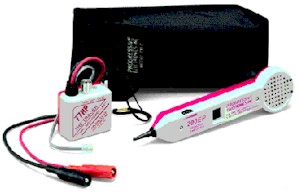
    A tone generator and probe will make it easy to trace
    and rearrange wiring.

    Put identifying tags on ends of wire segments. 
     
    Surge Protection & Backup Power

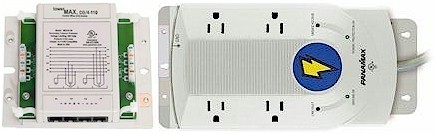
    Use a surge protector on the phone lines and power line!!! You can buy protectors from us.  Don't trust a $3 protector. Get something decent, with a good warranty. Protectors for multiple phone lines are harder to find. We sell protectors that can cover up to 25 lines.
     
     
    In case of a power failure, you can plug single-line phones into several jacks. The jack for the lowest intercom number will work on your first line, the next jack on your second line, etc.
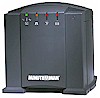
    Your Panasonic KX-TAW848 control units has an internal batteries to maintain programming for up to seven years, when the power is off.

    If you want full system functions during a power failure, you will need an external battery back-up system .Generally, the more you pay for the UPS, the longer your system will work without normal power.

    Email  Newsletter  AbleComm.com Home  AbleComm.info Home

    Call us toll-free, 1 888 ABLE 999

    038