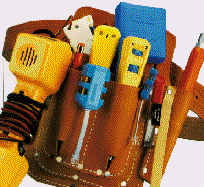
FAQ #703:
Can I install a phone
system?
The one-word answer is "probably."
If you're reading this, you're probably comfortable
with computers and other electronic devices. You might be involved in electronics as a
hobby, or as a business; and that experience can help you with your phone system. Many of
our do-it-yourself clients have installed computer networks, and many are doctors or
engineers. One is both an electrical engineer and a doctor, but you don't have to be
either.
If you've ever installed a basic
phone jack, or a speaker for your stereo system, you can probably install a phone system.
You have to be able to strip insulation off wire, without cutting the wire.
The best traits you can
bring to the job are patience, thoroughness, and good hands and eyes.
Even
if you've never done any electronics work, but are good with cars or woodworking or
plumbing, you'll probably be fine.
Be patient, and don't assume you know more
than you do.
The installation requires three
kinds of work, and you can choose to do some or all of it yourself, depending on time,
money, mood and motivation.
Phase One: Installing Wire,
the "Brute Work"
 |
| CLICK for
our power tools |
|
This part of the installation requires no particular electronics experience,
just some muscle, patience and common sense; and the ability to use tools like drills and
staple guns, and maybe "snakes."
It's often easier if you have a helper, even a
12-year-old helper.
If the 12-year-old has X-ray vision, you stand a better chance of not
drilling into water pipes.
You have to install wires from each
phone location to a central point where the control unit ("KSU") will be
located. You might be lucky enough to inherit wire from a previous phone installation,
that can save you blood, sweat, tears, time and money.
|
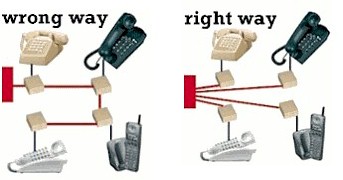 Whether you are installing new wire
or re-using existing wire, it must be in a "home-run" configuration (what
computer people call "star topography"), with a direct path from each phone jack
to the control unit. In residential construction, "loop-through" wiring is more
common, where the circuit passes from one jack to another and another. If you have a
loop-through arrangement, you can change some of the connections to reconfigure one or
more jacks as home-runs. Whether you are installing new wire
or re-using existing wire, it must be in a "home-run" configuration (what
computer people call "star topography"), with a direct path from each phone jack
to the control unit. In residential construction, "loop-through" wiring is more
common, where the circuit passes from one jack to another and another. If you have a
loop-through arrangement, you can change some of the connections to reconfigure one or
more jacks as home-runs.
If the wire is going into a house or
commercial building that already has walls, you'll probably end up with a combination of
concealed and exposed wire. In a home, it's common to run wire in attics and basements. In
an office, it usually goes above the ceiling tiles. If the space above the tiles is a
"plenum" for the building's heating and cooling system, you will need wire with
Teflon or similar insulation. It's more expensive than normal vinyl insulation, and a real
PITA to work with.
If the system is going to be in a
newly-constructed building or a place where there is extensive renovation going on, it's
much easier to install the phone wire BEFORE the walls are closed up -- at the same time
that the electrical contractor is installing the electrical wiring. You might want to pay
the electrical contractor or alarm guy to install the phone wiring, too. Typical charge
for this work, before the walls are closed up, is $25 to $50 per jack.

the real thing:
look closely! |
Make sure you or whomever you hire uses REAL phone wire,
not just some randomly-selected multi-conductor wire that happens to be in the back of the
truck. The wire should be 24-gauge,
"twisted-pair," category 3 (sometimes called "level"
3). Category 5 or 6 wire, which is normally used in
computer networks, will also work fine.
It is usually more expensive, and a bit harder to
use because the wire pairs are twisted together more tightly; but if you have some around
or can get a good deal on it, use it.
If your electrical contractor
says something like "don't worry, wire is wire," walk away, QUICKLY. The
traditional four-conductor wire (green, red, black, yellow) is no longer considered
adequate. It should not be used in new installations, but if there is some already in
place, it'll probably be OK to re-use. |
It's nice to have spare wire for additional devices
later on, or to compensate for wire damaged by plumbers or squirrels. If you are running
new wire, we recommend 4-pair or 6-pair 24 gauge to each phone location. Wire is cheap to
buy. Installing more wire later on is not cheap, and can be very messy.
You
can buy wire locally or from us. We also sell jacks, terminal blocks, adapters, tools,
cable and various hardware at PhoneGeeks.com
All phones except the
KX-T7130 and 7135 (when connected to an ancient
KX-T123211D control unit) use normal four-conductor modular
jacks -- the same stuff used for standard home phones. If you buy a phone
system from us, we'll
give you one free jack for each "system" phone. Just ask, and specify wall jack, flush jack, or
surface jack.
Digital phones can work on one pair
of wires, but need a second pair for the eXtra Device Port on the back of the phone.
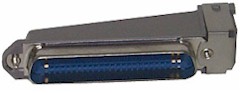 If you are replacing an older
"electromechanical" phone system that used 25-pair cable, we can provide
adapters that will allow you to put
modular plugs into the existing "Amphenol" connectors. You can also simply cut
off the connectors and attach standard modular jacks to the old cable. If you are replacing an older
"electromechanical" phone system that used 25-pair cable, we can provide
adapters that will allow you to put
modular plugs into the existing "Amphenol" connectors. You can also simply cut
off the connectors and attach standard modular jacks to the old cable.
Phase Two: Connecting
things to the wires.
You'll need good eyes and hands.
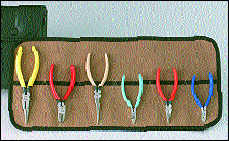
Are you a stripper or a
crusher?
Once the wires are in
place, you or someone will have to connect jacks to the ends of the wires where the phones
will plug in. In most cases, you will connect four wires in each jack, and you'll probably
use a wire stripper, a long-nose pliers, a screwdriver, and a wire-cutter. Phone pros
don't strip insulation off individual 24-g wires; they crush the insulation with a
long-nose pliers, and it slips right off.
The individual wires within the
outer jacket are color-coded with an industry-standard pattern. However, this wire pattern
does not match the color code used in most phone jacks, so follow this guide:
| Wire in Jack |
Wire in Wall |
NOTE: Some wire has
stripes on only half of each pair. For example, you may find a solid blue wire mated with
a white wire with blue stripes.
CLICK
for more on wire color codes. |
| green |
white with blue stripes |
| red |
blue with white stripes |
| black |
white with orange stripes |
| yellow |
orange with white stripes |
Make sure that the wires are looped
securely around each screw, between the washers, and not caught in the screw threads.
Don't remove any more than a minimum amount of insulation, and watch out for short
circuits (one bare wire touching two screws, or another bare wire).
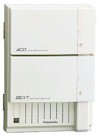
The
other ends of all these wires have to connect to the control unit, and the wires supplying
phone company dial tone also have to get to the control unit.
The control unit
mounts on the wall, and it's usually helpful to mount some plywood on the wall, to hold
the control unit and other components. A 2' by 4' piece of 5/8" or
7/8" plywood should be adequate. Try to mount it so the center is at eye-level,
with the wood panel horizontal. Most control units are about the size of a medicine
cabinet, and need a nearby electrical outlet. If possible, use an outlet on a circuit
that's dedicated for phone system use, only.
.
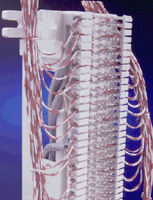 |
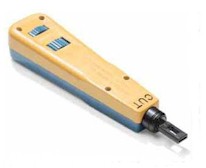
"Punch-down tool" attaches wires
to 66-block. |

Punch-down tool punching down.
Mark Henrichs photo |
"66-block" connects control unit
to wires coming from phone jacks |
|
|
|
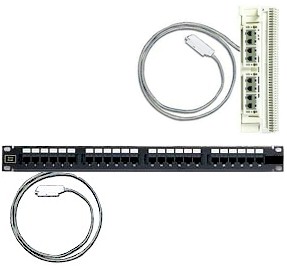
(top-left) AbleComm's custom-made Versa-Block
gives you the choice of punching-down or plugging-in, with Panasonic D308 and D1232
systems, and the expansion module on the D816.
We also have custom-made blocks for the
Panasonic KX-TA624 and KX-TAW848, and we have custom-made patch panels
for all Panasonic phone systems.
CLICK |
The KX-TD1232 and KX-TA1232 control units
and the KX-TD308 use "66-type punch-down blocks" and "25-pair
connectorized cables" to connect to the wires coming from the individual telephone
jacks. With a traditional terminal block, you'll need a punch-down tool to attach the
wires coming from the phone jack. This is the "professional" method. We can also
supply a terminal block with
integral modular jacks, so the entire
system can be snapped-together. This method is not as flexible, but doesn't require any
special tools or expertise.
The digital 816 control unit has modular
jacks for the first eight (or 16) phones. The expansion module for eight (or 16) more
phones has a 25-pair Amphenol-type connector.
more about the connections
|
Phase Three:
Programming the System (not
such a big deal)
|
|
 |
| All
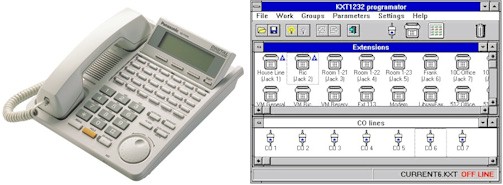
of our Panasonic systems can be programmed
from a display phone. The KX-TD308, KX-TD816, KX-TD1232, and KX-TAW848 can also be programmed with a PC. If you can
read, and dial a phone, you can program a phone system.
Click
for the most important programming steps. |
Phone system programming
should really be thought of as two processes: customizing (selecting from hundreds
of possible options, such as ringing patterns and toll restriction, to make the system
work properly for you) and
inputting
(dumping in data, such as
numbers for automatic dialing and names for Caller ID).
Your system should work just
fine, right-out-of-the box, with no programming changes at all. You'll probably want to
set the date and time and a few basic options at first, and gradually customize and
optimize the system over several weeks, months and years.
We're here to help you!

When you buy a phone system
from AbleComm, you're starting a relationship, not just making a purchase. We'll provide
hand-holding via phone, email or fax; and there's no charge for the help!
| A HORROR
STORY A while ago, I was called-in
to “rescue” a homeowner, whose phone jacks were installed by a blind retarded
butcher with an electrician's license. Despite his disabilities, this guy was apparently a
real smooth talker: he got the customer to pay a premium for American-made jacks, and many
feet of top-quality Category 5 wire, the stuff that goes into high-speed computer LANs.
I asked about the wire. The missus said “I told the electrician that the kids use
modems, and he said that this wire is best for sending data.”
Yeah, fine, sure. "Cat 5" is great for sending digital data from one PC to
another, but the stuff that comes out of a modem is SOUND, just like voices, and it flows
just fine though normal phone wire.
Unfortunately, the electrician's ignorance was exceeded by his arrogance. He didn't spend
$6.99 for a Radio Shack phone-installation videotape (or even $4.99 for the book). He
didn't know that the phone business has a generally-followed color code. He didn't know
enough, to know that he didn't know enough, so he proceeded to make up his own color code:
“Duh, lesseee now. The jack has a little red wire, but there's no red wire coming out
of the wall, but the brown looks kinda like red, so I'll use that. Now, green goes with
green; that's easy, good. Halfway done. OOPS, I'm in trouble again. The jack has a yellow
wire, but there's no yellow in the wall, so I'll use orange; that's close enough. Unless
orange is supposed to go with the red. Hmm, I better connect them all together just be
safe. And “blue” starts with B just like “black,” so I'll put them
together. All done.”
And in good electrician style, ol’ Sparky carefully stripped the insulation off the
ends of all the white wires, and twisted them together and covered them with a big
blob of friction tape. Amazing. The best wire in the world, causing the worst crosstalk in
the world.
It took about three days to repair the damage.
|
|

 What's
involved in setting up a phone system? What skills & tools do I need? Wiring basics.
Stripping vs. crushing. Punching vs. plugging. A little bit about programming, and a funny
horror story.
What's
involved in setting up a phone system? What skills & tools do I need? Wiring basics.
Stripping vs. crushing. Punching vs. plugging. A little bit about programming, and a funny
horror story.