COMMENTS
& TIPS
- Most important comment: voice quality is
fine; maybe not quite as good as on the much-more-costly hard drive
voice processors, but certainly good enough. The medium is not
affecting the message very much.
- Most important surprise: two VS50s can be
connected to one KX-TA624, for a low price 4-port setup.
- Most unexpected pleasure: CD-ROM manual
with hyperlinks.
- Most unexpected advantage of flash memory:
faster turn-on of message lights.
- Best thing about the VS50: low price.
- Coolest thing about the VS50: Caller ID
tricks.
- Weirdest thing about the VS50: manual for
KX-TA624 is on the VS50 CD-ROM.
- Worst thing about the VS50: choice of
actress for prepared messages ("system prompts"); she sounds
like a whore in a hurry.
- Biggest Blooper: Instructions for
"DIP" switch are confusing.
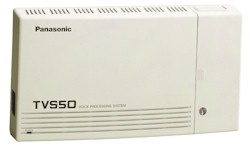
- The 50 is full of features, but very small, physically. Even though the
housing is the same as the one used for the KX-TVS75 and KX-TD308, it
seemed smaller, maybe because the packaging is more compact. Panasonic
supplies the 50 in a double box, but the total package is still small -- about the same size as a 7400-series phone.
- Serial port connector is a male DB9, pointed downward
and usable with the cover on; unlike the VS75 which has a female DB25
which is usable only when the cover is off.
- I can understand changing
the location and size of the connector, but why change the gender?
I've long been annoyed by the lack of standardization among Panasonic
products -- such as the serial connectors on the KX-TD1232 and
KX-TVS100 facing in different directions; and now we have two similar
voice processors with connectors that serve the same purpose, but have
different positions, sizes and genders. Why should installers have to
carry a collection of cables and adapters?
- The panel beneath the small cover on the right
side of the unit has been re-designed from the VS75, to include a ferrite core
to
surround the line cord. We heard no difference with it and without it.
Apparently it's supposed to keep noise from leaking out, not leaking
in.
- The jacks and ground
connection have been moved, but we still get a label telling us that
the unit "must be earthed." Here in the USA -- the country that won
the war with England -- that's called "grounded."
- You can probably use a 25-pin null-modem adapter
with a gender changer and 25-to-9-pin adapter, but we wanted to
minimize potential foul-ups, so we used a 9-pin female-to-female
serial cable, and a 9-pin null modem adapter from RatShack. You'll
have to remove some itty-bitty hardware to plug it into the VS50.
Watch out for un-needed couplers on the end of the cable that goes in
to the PC, too.
 |
TIP: Instead of
mounting your voice processing system next to the phone system
control unit, mount it near one of your computers, so it's easy to
make programming changes. It won't take up much space, and the
wiring is very simple -- much simpler than extending a serial cable
50 feet. |
- Access the "Message
Manager's Main Command Menu": dial the intercom number for
the voice processing system, then #, 6, *, 998 (or 98 for the
KX-TD308).
- Press [5] to
modify messages.
- Press [6]
to modify the user prompts,
- Press [1]
to change a specific prompt .
- Enter the prompt
number you want to change. Prompt 819 is "welcome to the voice
processing system." 248 is "good afternoon." 249 is
"good evening." 250 is "good morning."
- Continue following
instructions.
- NOTE:
by eliminating the pre-recorded prompts, you will
cause a delay between the end of ringing and the first sound
that callers will hear. To minimize the delay, we recommend that
you replace prompt 819 with your own brief message ("Thank
you for calling Acme International") which will be be
played immediately before your main menu (usually "custom
1"). Thanks to Panasonic techwizard Rich for this
tip.
|
- There's
another advantage to making this initial recording:
If there is an emergency or
temporary change in your company's schedule, you can call in from
anywhere and change the opening message to something like "Thank
you for calling Honest Charlie's Used Cars. Because of Hurricane
Hilda, we will be closed until Wednesday," but you won't have to
re-record your big main menu.
- The lack of moving parts seems to have speeded up
operation. The Message Waiting light is illuminated less than a
second after a caller hangs up after leaving a message, and the port
is quickly available for the next call.
Michael N. Marcus
|