|
Optimizing
& troubleshooting your phone system
Email your suggestions to add to
the list
Click
for more tips
|
|
|
- If you are programming a digital phone system or
the KX-TA1232, and your phone does not have a
PROGRAM button, use the PAUSE button. Remember that both
"program" and "pause" start with "P."
|
- Instead
of mounting your voice processing system next to the phone
system control unit, mount it near one of your computers, so
it's easy to make programming changes. It won't take up much
space; and the wiring is very simple -- much simpler than
extending a serial cable 50 feet.
|
- Bad 7200 series phones.
It's fairly common for Panasonic digital 7200 series phones to have bad
and/or intermittent audio on the handset, and it can get so bad that the
phone has to be replaced or sent to Panasonic for repair. Here's a great
do-it-yourself fixit tip from Bertel Schmitt:
|
"I opened a recently deceased 7235 and noticed
discoloration and crud at the bottom right of the printed circuit board
(viewed from component side). I cleaned the PCB with contact cleaner and a
toothbrush. The 7235 came back to life.
I then went to the box with the dead 72XX phones and opened them all. All
had the same discoloration at the bottom right of the PCB, and various
degrees of crud on the PCB. All could be revived using the procedure
above, and are now working fine.
I don't know exactly what's going on, but I suspect a breakdown of PCB
coating. The crud is pretty thick sometimes, and it has to be carefully
removed. It's always in the same area. A strategic area appears to be
around the wire that connects the PCB with the handset jack.
Note: We are not talking dirt here. These are phones from various
locations, some desk mounted, some wall mounted, all areas are clean. And
the problems are always in the same place.
If you have 72XX phones, I recommend preventive maintenance with contact
cleaner, toothbrush and possibly a new clear protective coating."
|
- Sometimes, first is
really second. When installing a Caller ID circuit module in
the KX-TD1232 or KX-TA1232 control unit, remember that the module for
the first four lines goes in the lower section of the
control unit. Make sure all the pins in both ends of the module are
lined up properly with the sockets on the main circuit board.
|
- Sometimes, second is
really first. In the Panasonic digital phone
systems, the programming documentation, for such features as line
ringing, identifies a digital pair of wires as (jack number)
"-1" and
the analog pair as (jack number) "-2". This nomenclature is the
opposite of the sequence for the pairs on a 66-type punchdown
block.
| For example, the first pair wired
to a 66 block (white/blue, the analog pair of the first "jack")
is used for the eXtra Device Port on a digital phone or an
analog phone in another location, even though programming
identifies it as 1-2.
The second pair
(white/orange, the digital pair) goes to a Panasonic digital
phone and is programmed on Jack 1-1.
BIG THANKS to Randy
Kauk for this important reminder.
|
|
- Panasonic digital phone systems can provide
two kinds of Call Waiting, and it
can be very confusing.
|
| |
-
Normal Call
Waiting, provided by the phone company, is activated by pressing
the button under "EFA" (External Feature Access) in the display.
If you are not using a display phone, you can use the Flash
button, if you re-program it to function for EFA. Use system
program # 990, area 01. Change Bit 3 (the third digit from the
right) from 0 to 1.
-
"Internal" or
"system" Call Waiting allows you to know that someone is trying to
reach you on the intercom (and can also give you Caller ID and a
low-level ring on an outside call when you are using the phone).
To set up this option, press Intercom, then 7311, then press
SP-Phone to hang up.
|
|
- If a multi-line analog phone (including the KX-T7880, 7885,
7894 and 7895 cordlesses) doesn't work in a Panasonic digital phone system, make sure XDP is DISABLED for
the particular jack (program #600). Also make sure that you are using a
line cord with four conductors, and that all four wires in the jack are
live. If it doesn't work in one of the last four jacks in a
KX-TD308, there is a good chance that the system does not have a KX-TD30870 analog
expansion module.
|
- If you are adding a
KX-TA62470 expansion module to a KX-TA624 control unit, it
must be installed in the slot closest to the front of the cabinet; and a
3 x 16 system will have phones numbered 101-108 and 117-124. Only the
KX-TA62477 can be used in the middle section, and it enables phones
109-116.
|
- If you are replacing an
older analog KX-T123210 or KX-T123211 with a new KX-TA1232 or
KX-TD1232, you have to make a minor wiring change to connect the outside
phone lines. The older systems used RJ11 single-line jacks, but the new
models use RJ14 two-line jacks. If you don't "double up" in the jacks,
the phone buttons for line #2 won't have dial tone, and the buttons for
line #3 will have line #2. The buttons for line #4 won't have dial tone,
and the buttons for line #5 will have line #4, etc.
|
-
Electronic
stuff can be weird, even perverse. Computers and
phone systems do things that make absolutely no sense, are
totally illogical, and may seem physically impossible. We
went through a week of torment trying to
install a KX-TVS200 voice processing system with one 4-port
KX-TVS204 module, on a KX-TD1232 phone system.
The
first of the four ports (#165) refused to answer, but the
phone displays indicated that we were indeed calling the voice
processor's first port. Ports 166, 167, and 168 worked
fine. Even
though it seemed illogical, we followed Panasonic's advice to
swap wires, re-punch wires and replace wires. We also replaced
the VS200, replaced the VS204, verified the port service
settings, defaulted both VS200s, tried different extensions on
the D1232, deleted and re-did the program 117 settings that
specify which jacks the VS200 are connected to... and nothing
helped. The
ultimate cure was was very simple. We disabled program 117 and
plugged a regular digital phone into the jack where we had
tried to use the voice processor. The phone worked fine. Then
we re-did 117 to specify the voice processor jacks. The sky
cleared, the sun shone brightly, the birds chirped happily,
and all was well with the world. BIG
THANKS to Panasonic tech wizard Rich for his help on this
one. |
|
- IMPORTANT KX-TA1232 NOTE:
when programming a Panasonic voice processor to use with the
KX-TA1232, if the voice processor Quick Setup section doesn't list the
KX-TA1232, select
KX-TD1232, not the analog 1232!
|
- Voice
Processor Tip: Instead of starting with a "custom
service" menu, record a brief "company greeting"
message (KX-TVS75, 100, 110, 120, 200, 220, 300, 320) or replace system prompt #819
(KX-TVS50, 80 and 90) with a brief announcement, such as "Thank you for
calling Honest Charlie's Used Cars." If there is an emergency or
temporary change in your company's schedule, you can call in from
anywhere and change the opening message to something like "Thank
you for calling Honest Charlie's Used Cars. Because of Hurricane
Hilda, we will be closed until Wednesday," but you won't have to
re-record your big main menu.
|
- Trouble
programming your VPS?
If you can't get your computer to communicate with your KX-TVS75, 90, 100,
110, 120, 200, 220, 300 or 320 Voice Processing System, shut the power off, turn the
little rotary switch from zero to one, turn the power back on, and turn
the rotary switch back to zero. (BIG THANKS to Panasonic tech wizard
Denton for this life-saver.) The process is different with the KX-TVS50, 80
and 90. Shut off the power, move the "DIP" switches to right, left,
left, left. Turn the power back on, and move the switches to left, left,
left, left.
BIG
THANKS to Panasonic tech wizard Frank for his help on this one.
|
- If your PC can't communicate with a
Panasonic phone system control unit, do a system clear and reset.
(You will lose all programming and return to default
settings.) CLICK for
more info on PC programming.
|
- A Panasonic digital phone
system can automatically correct the displayed time based on
information sent with Caller ID, once a day. Change field (or
"bit") #1 of area #05 in program 990. Some manuals show this
as field #30.
|
- If your phone system seems
hopelessly
messed-up, with weird light patterns, strange sounds,
non-functioning features, etc, shut it off for a minute or two, then
turn it back on.
| There's a very good
chance that the trouble will go away, without paying a penny for
repairs.
This also works for computers,
cordless phones, appliances, calculators, even cars.
Microprocessors (smart circuit
chips) can get confused; and like human brains, they often work
better after a rest. Lots of "defective" products work perfectly
by the time they arrive at the repair place.
If the malfunctioning machine uses
batteries instead of AC, pop them out for a little while. In a
car, carefully disconnect a battery cable. |
|
- When diagnosing a malfunction, test every
piece of hardware that is involved. You'd be surprised at the things that can be
improperly manufactured, inadequately tested, or ruined by human contact. We recently
installed a phone system, and the door intercom wouldn't work. We replaced the door
speaker, and then the intercom module, and were about to replace the entire control unit,
when I decided to check the cord that was plugged into the intercom module. That stupid $4
cord -- which had no right to be defective -- had caused the problem. It wasted our time
and annoyed our customer. We'll remember it, and you should, too.
Anything can be made
wrong, or messed up. Things that people touch are more likely to get messed up than things
that don't get touched.
|
- You can eliminate the alerting tone that people hear
when you join a conversation, by changing field # 13 in program # 990 in the digital
systems. This is good for managers who have to monitor staff members who interact with the
public, and for kids who want to listen-in on parents' or siblings'
phone calls.
|
- People often forget feature codes, so program some
buttons to activate important features with a finger tap or two. Set up buttons to page
all phones, activate and deactivate call forwarding to an answering service, switch from
day ringing to night ringing, etc.
|
- Even if you don't care about providing music-on-hold, a radio plugged
into your phone system's control unit can provide background music or
radio through your phones' speakers. The sound will stop when the phone is in use, but you
can also program buttons for RADIO ON and RADIO OFF.
|
- Great idea from Chris Arndt: Connect a
weather radio
for weather-on-hold, and weather reports at all system phones when you
tap a button for background "music.".
|
- Connect your fax
line to an unused "CO" line circuit, and
set it for a distinctive ringing sound (on a digital system). When a fax comes in,
everyone who should know about it, will know about it, even if the fax machine has a low
ring and is stuck in a back office.
|
- Panasonic phones systems are very robust. They are hard to kill, but
can be temporarily wounded. If your system crashes
and you can't bring it back to life by resetting, disconnect all the
wires going to your phone jacks. Then plug one in. If the phone works,
keep re-connecting the others until you crash again. Once you find the
bad wire segment, disconnect it and inspect it. Chances are, you'll find
some damage to the wire, or maybe something soggy in the jack. If you
have an outdoor jack, check it first.
|
- If a phone is dead or intermittent, try it in
another jack that you know works OK, to see if the trouble is with the phone or the jack.
If you determine that the phone is faulty, swap its pluggable parts with another phone to
zero-in on the defect. Most-likely sources of trouble (starting with most-likely): handset
cord, handset, line cord, phone base, jack, wire between jack and control unit, control
unit.
|
- Things that people touch are more likely to break
than things that don't get touched. Wire outside a wall is more likely to have problems
than wire inside a wall. Phone equipment in an active office is more likely to have
trouble than phone equipment in a locked closet.
|
- With a KX-T123211D, KX-TD1232, KX-TA1232, KX-TD816, or KX-TD308, if one or several
phones
don't work, particularly in the highest-numbered or lowest-numbered jacks in each
group of eight (but not the first eight in the D816), there is a very good chance that the
25-pair Amphenol plug has come loose from the female connector in the control unit, or in
an expansion module.
|
- If a phone has been unplugged and plugged back in and doesn't work,
make sure that both ends of the cord are snapped in securely. On a
digital phone, make sure its line cord is in the jack labeled "TO
EMSS" (7200 series) or "TO MAIN UNIT" (7400 series).
|
- If an analog system phone's speaker works, but the
handset doesn't,
check to see if the headset/handset switch is set for a headset.
|
- If an analog phone is dead and you're sure it's plugged into a live
jack, check to see if the Program/Set switch is in the Program position.
If it is, move it to Set.
|
- If you need LOUD volume coming out of a Panasonic
phone, you can easily connect a public address "horn" speaker. This works well
at pool cabanas and in factories. You can get one at Radio Shack for about $40.You'll be
surprised how far voices will carry with no additional amplification. The normal
microphone should work quite well, too. You can modify a Panasonic door intercom speaker
the same way, if you only need intercom capability. Modifications like this may void your
warranty -- BE CAREFUL!
|
- If a phone has lights, but no sound, check to see if
one of the buttons is being kept pressed-down by the plastic overlay sheet, particularly
on first-generation phones like the KX-T61630 with 12 auto-dial buttons. If a button has
slipped behind the plastic, wiggle it so it pops though the proper hole, and you'll avoid
a $75 service call.
|
- A 2-line cordless phone can work very nicely in a
Panasonic phone system. Connect each line to a different extension port from the control
unit. Remember that the hold button will hold a call in the phone, but
NOT in the system -- you'll need to use the flash button for that.
|
- Unless you really want visitors at your
front door
to be answered by a robot voice, make sure that any jack you're using for an answering machine
or voice mail, is programmed NOT to ring on calls from the door intercom.
|
- Paging announcements will not reach
ordinary single-line phones that lack the speakers found in "system phones."
Here's an easy trick that can make all your phones ring from an intercom call: Connect one
station port to a CO line port. When you call the intercom number for that station port,
it will send ring voltage to the CO port, and ring all phones that are programmed to
ring. If you have a digital system, you can program internal all-call calls to sound
different from external calls. If you have enough ports, you can program this even
further, with different zones (groups of phones that can be rung by dialing a number).
|
| GREAT IDEA from
Russia |
|
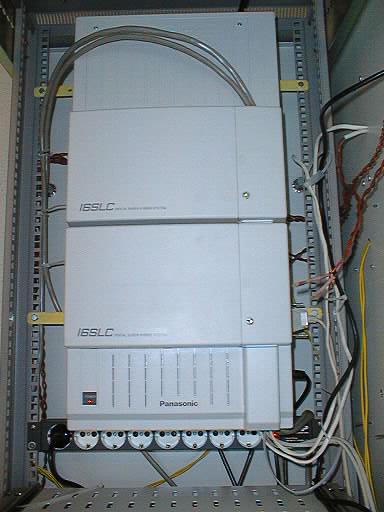 Most people route the 25-pair cables from the bottom of
expansion modules on the front panels of the digital 816 and 1232 control units. Most people route the 25-pair cables from the bottom of
expansion modules on the front panels of the digital 816 and 1232 control units.
This photo shows an installation by Andrey Andreanov, a computer
engineer, Website designer, and Panasonic phone system installer in Moscow. Andrey has the
cables exiting from the top, where they will stay out of the way when the
1232 front panel is opened.
For more photos of this installation, an elaborate supermarket
system with two D1232s in a relay rack and 8 car batteries for backup power, go to Moscow.
|
|
|
|
|
|
|
|
|