|
AbleComm: Panasonic Phone Systems & Phones what's special about Panasonic? © 1997-2003 AbleComm, Inc. All Rights Reserved. special-pan.htm 1/4/03 Email Newsletter AbleComm.com Home AbleComm.info Home Call toll-free, 1 888 ABLE 999 ORDER ONLINE |
|
|
AbleComm: Panasonic Phone Systems & Phones what's special about Panasonic? © 1997-2003 AbleComm, Inc. All Rights Reserved. special-pan.htm 1/4/03 Email Newsletter AbleComm.com Home AbleComm.info Home Call toll-free, 1 888 ABLE 999 ORDER ONLINE |
|
NOTE: There are many photographs on this page; read while they load. |
|
|||||||
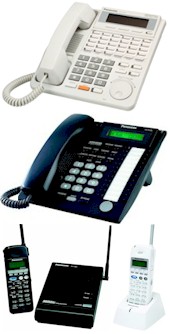
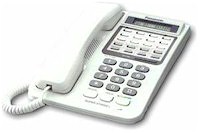 Our Panasonic phones can be
used on a desk or table, or mounted on a wall, and come in black, charcoal and off-white. Variations
include LCD displays showing one, two, three or six lines of alphanumeric text,
hands-free conversation, and 3, 6, 12, 16 or 24 "soft key" buttons. These buttons can be
used to select an outside line, to call someone inside or outside the building with just a
touch, and to activate features such as background music, night ringing
mode, voice mail transfer, or paging. Some buttons are
illuminated, and can show when certain people are using their phones. Our Panasonic phones can be
used on a desk or table, or mounted on a wall, and come in black, charcoal and off-white. Variations
include LCD displays showing one, two, three or six lines of alphanumeric text,
hands-free conversation, and 3, 6, 12, 16 or 24 "soft key" buttons. These buttons can be
used to select an outside line, to call someone inside or outside the building with just a
touch, and to activate features such as background music, night ringing
mode, voice mail transfer, or paging. Some buttons are
illuminated, and can show when certain people are using their phones. |
|||||||
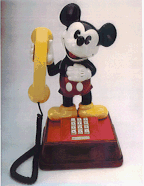 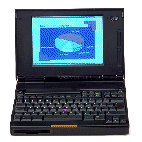 The
phone jacks in AbleComm's Panasonic telephone systems are known as "Universal Ports."
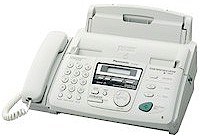
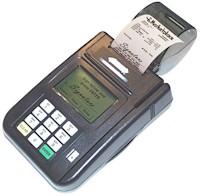
You can plug-in multi-line phones, fax machines, modems, credit card terminals and
single-line corded or cordless phones, with no added equipment or new programming; and
they'll have access to all lines, intercom and most features. The
phone jacks in AbleComm's Panasonic telephone systems are known as "Universal Ports."
You can plug-in multi-line phones, fax machines, modems, credit card terminals and
single-line corded or cordless phones, with no added equipment or new programming; and
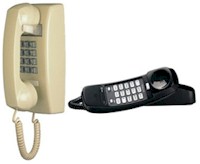
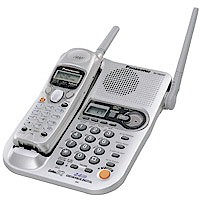
they'll have access to all lines, intercom and most features. If you have a funny phone or a fancy phone, or almost any kind of phone, it will work with your Panasonic phone system -- on all your lines and intercom -- and provide access to a wide range of features. You can be up on the roof with a cordless phone, and talk to the UPS driver at your door. Mickey Mouse phone © Walt Disney Productions |
|||||||
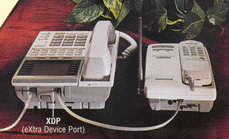 AbleComm's Panasonic DIGITAL PHONES have a unique and very useful feature, the "XDP"
(eXtra Device Port). It's an additional jack on the back of the phone where you can
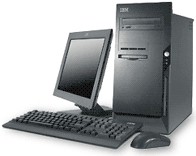
quickly plug-in a PC modem, or a fax or cordless phone or other gadget that's important to
your business or home. There's no need to get an additional jack installed, no wiring
changes, no additional circuit boards to install, and no added expense. AbleComm's Panasonic DIGITAL PHONES have a unique and very useful feature, the "XDP"
(eXtra Device Port). It's an additional jack on the back of the phone where you can
quickly plug-in a PC modem, or a fax or cordless phone or other gadget that's important to
your business or home. There's no need to get an additional jack installed, no wiring
changes, no additional circuit boards to install, and no added expense. |
|||||||
Or if you prefer, you can assign the same extension number to the XDP, so a cordless phone you carry, will ring when someone calls the phone on your desk. If your needs change, you can quickly change the programming for a particular XDP.
|
|||||||
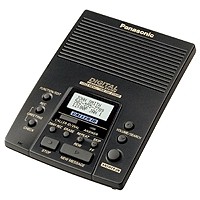
One central answering machine can respond to several or all of your phone lines, and can even answer different lines at different times of day. If people are using your first two lines, and a call comes in on the third line, the answerer gets the call. |
|||||||
A fax machine, credit card terminal or PC modem can dial out on any available line, but be programmed to answer only a particular line.
|
|||||||
|
|||||||
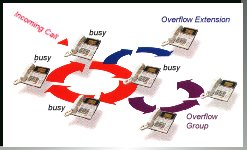 In a digital system, after a call is answered, it can be transferred
to the appropriate group or department, where multiple
phones will ring. Up to eight
ring groups can be created, with an unlimited number of extensions in each group. People
can temporarily log into and out of a ring group, as staffing requirements and individual
priorities change during the workday. In a digital system, after a call is answered, it can be transferred
to the appropriate group or department, where multiple
phones will ring. Up to eight
ring groups can be created, with an unlimited number of extensions in each group. People
can temporarily log into and out of a ring group, as staffing requirements and individual
priorities change during the workday.Uniform Call Distribution (UCD) evenly distributes incoming calls to specific people ("agents") who are logged into a group for shared functions, such as sales, tech support, etc. With the optional DISA module in a KX-TD1232 system, four different outgoing messages can be recorded and played in a cycle; and a separate phone can be assigned for overflow calls. |
|||||||
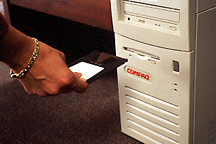 All of AbleComm's Panasonic phone systems can be programmed
easily from a display phone. You have a wide range of programming options to
customize and optimize your system, but it will work just fine right-out-of-the-box with
no programming changes. All of AbleComm's Panasonic phone systems can be programmed
easily from a display phone. You have a wide range of programming options to
customize and optimize your system, but it will work just fine right-out-of-the-box with
no programming changes.
Our digital systems can also be programmed from a PC, and you can easily back-up your programming onto a floppy disk or hard drive, for easy re-loading after a chip change, or a disaster. |
|||||||
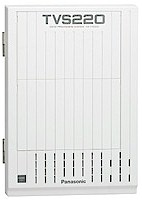 A Panasonic voice processing system will work with any Panasonic phone system, but works best with the digital systems. Get voice mail, auto attendant, pager notification, call forwarding, interview, live call screening, call recording, remote access, info dispensing, three languages, holiday schedules, more. Easy install, great voice quality. Three models, with up to 8 ports, 1096 mailboxes and 32 hours recording time.
|
|||||||
 |
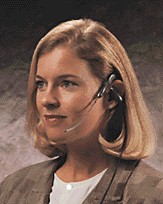 A Panasonic phone can let you conveniently use a
HEADSET for hands-free low-fatigue conversations, without having to pick-up and hang-up
the handset. Read more about headsets A Panasonic phone can let you conveniently use a
HEADSET for hands-free low-fatigue conversations, without having to pick-up and hang-up
the handset. Read more about headsets |
||||||
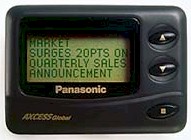
| If you are away from your desk, a call can AUTOMATICALLY FOLLOW YOU to any other phone in the world, or your pager can beep you. | |||||||
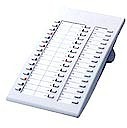 Office receptionists can have "DSS/BLF*" display panels for up to 128 people. Illuminated buttons will show the status of all phones in the system, and allow QUICK TRANSFERS AND QUICK INTERCOM CALLS to any phone. * Direct Station Selection/Busy Lamp Field |
|||||||
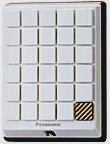 Optional accessories include door intercom, door opener, battery backup, remote programming modems, Caller ID and expansion circuit modules. With a DOOR INTERCOM, you can speak to a visitor from any phone -- even if you are in the backyard with a cordless. The DOOR OPENER option lets you press a button on a phone to unlock the door -- a great way to have security, conveniently.
|
|||||||
| Email Newsletter AbleComm.com Home AbleComm.info Home |
 |
| Call us toll-free, 1 888 ABLE 999 | |
004