CLICK for Windows Software
|
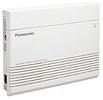
The KX-T30810,
KX-T61610
and KX-TA624 were designed for programming from a display phone.
A version of Programmator
has been developed for the 624, but we have not tested it and do not support
it.
The KX-T123211D
can be
programmed from a PC. However, the software is old and a bit
primitive, and is NOT supported by Panasonic. Apparently, most of Panasonic's techies have
never even seen it.
The KX-TA1232 can not be programmed by PC, but it can be backed up and restored
with a PC, using proprietary Panasonic software.
|
 The
KX-TAW848 was designed for programming
from a display phone such as the KX-T7735, or with a PC through its DB9 serial
port or its USB port. The
KX-TAW848 was designed for programming
from a display phone such as the KX-T7735, or with a PC through its DB9 serial
port or its USB port.
Windows software is supplied by Panasonic. You can use an AbleComm
ProCable
or
ProConnector Kit, or a serial cable and null-modem
adapter from Radio Shack, or a USB cable.
You can also program a KX-TAW848 system remotely, if it is connected to a
KX-TAW84896 remote programming module.
|
|
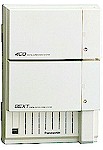
The KX-TD308, 816 and 1232
can be programmed from a display phone, or from a
PC. Many of our customers use
Programmator
software for
Windows. Panasonic's own DOS and Windows software is not available to
end-users. You CAN'T program these systems with HyperTerminal.
Complex programming tasks, like
entering lots of names for speed dialing or setting up a big "DIL1:N" ringing
table, are easier to do from a PC than from a phone. For simple stuff, like changing from
daylight time to standard time, or changing someone's last name, there's no need to bother
connecting a PC.
If you have an extra PC, even an old
slow PC, you can keep it connected permanently for spur-of-the moment programming, and
to view call data as each call is completed.
You can also program a KX-TD816 or
1232 system remotely, if it is connected to a modem.
The installation manuals have diagrams for
making a cable to connect a PC to the 25-pin serial port in the D816 and D1232, and
9-pin port in the D308. It's easier to use an AbleComm
ProCable
or
ProConnector Kit, or a serial cable and null-modem
adapter from Radio Shack.
|
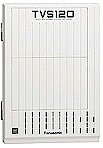
The
KX-TVS series Voice Processors are programmed from a PC. They CAN'T be programmed from a phone, but
some adjustments can be done from a phone after the initial setup, even remotely.
They do NOT need special software. You can
use almost any general purpose PC communications software, such as Windows HyperTerminal, to access the software embedded in the
voice processor. There's also a great Windows program.
CLICK
for info and free demo download of Voice Mail Master.
The installation manuals have diagrams for
making a cable to connect a PC to the unit's serial port. It's easier
to use an AbleComm
ProCable
or
ProConnector Kit, or a serial cable and null-modem adapter from Radio Shack. The KX-TVS50,
75, 80, 90 and 95 have 9-pin connectors; the others have 25-pin connectors.
You can also use a Mac, with a basic Mac
comm's program.
|
|
|
If you can't connect:
- Make sure to set Flow Control to OFF or NONE.
- Make sure you have selected the proper serial port.
- Be wary of adapters that go from 9 pins to 25 pins
and gender changers -- the fewer connections you have, the better your
chances of successful connections.
- Try both 9,600 and 19,200 speeds.
- On Voice Processing Systems
with rotary switches, shut power
off, turn rotary switch from zero to one, turn power back on, turn
rotary switch back to zero. (Thanks to Panasonic tech wizard
Denton for this life-saver.)
- On Voice
Processing Systems with DIP switches instead of rotary switches,
shut off the power, move the "DIP" switches to
right, left, left, left, turn the power back on, and move the switches
to left, left, left, left. (Thanks to Frank at Panasonic for
this.)
- On Panasonic phone system control
units, do a system clear and reset. (You will lose all programming
and return to default settings.)
- Try another computer (really).
|
|
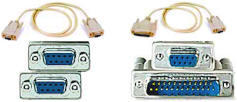 AbleComm's
ProCables have been tested with all the Panasonic phone systems and
voice processing systems we sell, using HyperTerminal, Programmator and
VoiceMail Master. They are priced about $4 less than an equivalent cable
and adapter from Radio Shack and about $13 less than the
"wholesale" price charged by another company.
CLICK to
order online, or call 1 888 ABLE 999. AbleComm's
ProCables have been tested with all the Panasonic phone systems and
voice processing systems we sell, using HyperTerminal, Programmator and
VoiceMail Master. They are priced about $4 less than an equivalent cable
and adapter from Radio Shack and about $13 less than the
"wholesale" price charged by another company.
CLICK to
order online, or call 1 888 ABLE 999.
|
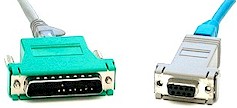 With
AbleComm's new ProConnector Kit, you can program your phone system or
voice processor up to about 60 feet away from the phone equipment
closet (maybe even more feet -- we're not sure of the limit). The ProConnector-25 kit consists of specially wired adapters to
convert from DB25 and DB9 to 8-pin ("RJ45") jacks. Our ProConnector-9
kit adapts two female DB9 connectors to RJ45, for use with the KX-TD308,
KX-TA624 and KX-TVS50. You can use an RJ45 patch cord, or connect to
data jacks and patch panels (568B wiring pattern.)
CLICK to
order online, or call 1 888 ABLE 999. With
AbleComm's new ProConnector Kit, you can program your phone system or
voice processor up to about 60 feet away from the phone equipment
closet (maybe even more feet -- we're not sure of the limit). The ProConnector-25 kit consists of specially wired adapters to
convert from DB25 and DB9 to 8-pin ("RJ45") jacks. Our ProConnector-9
kit adapts two female DB9 connectors to RJ45, for use with the KX-TD308,
KX-TA624 and KX-TVS50. You can use an RJ45 patch cord, or connect to
data jacks and patch panels (568B wiring pattern.)
CLICK to
order online, or call 1 888 ABLE 999. |
|
 |
There are many ways to construct a null-modem adapter or
null-modem cable, and this situation drives us NUTS.
-
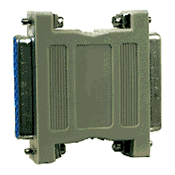
The Radio
Shack #26-1496 25-pin null-modem adapter ($5.99, similar to photo at left)
works fine with Panasonic phone system control units 99% of the
time, and works fine with Panasonic voice processing systems 89%
of the time. Use model 26-264 for the KX-TD308, and the
smaller voice processing systems that have 9-pin connectors.
-
The Belkin
null-modem adapter, available at Staples and many computer stores, such as CompUSA,
works fine with the voice processing systems 99% of the time, but NOT with phone system control
units.
-
And to make things
even worse, the Belkin adapter seems to work fine with HyperTerminal, but NOT
with Voice Mail
Master.
|
|
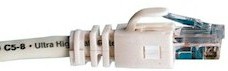 We are very pleased to
share with you a wiring plan for making your own programming cable, developed by Debra
Canfield. Debbie's design will allow you to use 8-pin "RJ-45" connectors, so you can program from a PC located many feet from the phone equipment, using
normal 4-pair wire instead of a thick serial cable. Thanks very much, Debbie. We are very pleased to
share with you a wiring plan for making your own programming cable, developed by Debra
Canfield. Debbie's design will allow you to use 8-pin "RJ-45" connectors, so you can program from a PC located many feet from the phone equipment, using
normal 4-pair wire instead of a thick serial cable. Thanks very much, Debbie.
|
The following chart shows the 25 pin phone system or voice processor connector on
the left and a 9 pin PC connector on the right.
| SD 2 |
2 RD |
| RD 3 |
3 TD |
| CTS 5 |
7 RTS |
| DSR 6 |
4 DTR |
| SG 7 |
5 GND |
| DTR 20 |
6 DSR |
This works with Windows HyperTerminal and Flow Control of None. Other
settings are as described in the manuals or in the software.
In my case, I didn't really make a "cable." I configured modular RS232 to RJ45
connectors with the necessary pin configuration and attached the two with a 4 pair patch
cord.
Once I had it tested and working that way, I changed it to what I really wanted. That
is: In the wiring closet in our new addition where the telephone/voice systems are
located, I attached modular RS232 connections to the telephone and voice systems. To those
I attach an RJ45 to 4 pair 110 patch cord that I attach to a 110 block that is connected
to a 110 block in my old wiring closet in the other part of the building.
In the old wiring closet I used a 4-pair 110 patch cord to connect the new closet
connection to a 110 block connected to an RJ45 outlet by my desk. At my desk I attached an
4 pair RJ45 cable from the RJ45 outlet to the modular connector in the back of my PC.
Actually, I have one of the RJ45 outlets by my desk connected through to the telephone
system and another to the voice system, so I
just move the cord to whichever one I want to communicate with. This works great, but all
people need to know is the pin configuration above. Then they can adapt it to their own
situation.
By the way, I imagine you realize that the maximum length of the cable (stated at 6.5
feet in the telephone system manual) is nonsense. My total "cable length" is
over 300 feet and includes 7 connections. Debra Canfield
|
|
|
|
If
you are a masochist with a lot of time to kill and want to experiment, the charts below
include the wiring recommendations from various sources. |
|
|

 Read this page