| Background: A
phone system usually has phones, a central control unit, accessories, wire, and jacks. The
phone jacks on your walls, which are connected to "station ports" inside the
control unit, are what make Panasonic phone systems so special. A port is a circuit -- an
electronic address with specific characteristics -- and may correspond to an actual phone
jack, or to part of a jack. One jack can contain one or several ports. Some phones can
work with one port, some need two. Sometimes "port" means the same thing as
"jack," but sometimes it doesn't. A standard phone jack has four wires: green, red, black, and yellow. In
Panasonic phone systems, it's convenient to think of the green and red wires as a voice
(or analog) port, and the black and yellow wires as a data (or digital) port.
 |
- With a Panasonic analog or digital system, you can use a multi-line phone, just as with other phone systems.
- You can also instantly connect any single-line analog phone or device (such as a fax machine, modem*, cordless
phone, answerer or credit card authorization terminal. This "universal port"
design can save time and money, and increase efficiency.
- The single-line device can be used in a jack instead of a multi-line phone, or it can share a jack with a simple
"T-adapter" that allows two phones or devices to connect to one jack.
- In the diagram at left, "PITS" stands for
Proprietary Integrated Telephone System. It means a multi-line phone designed to work in a
Panasonic phone system.
|
The UNIVERSAL PORT and SHARED PORT designs that
Panasonic pioneered in its analog system, and the XDP (eXtra Device Port) enhancement in
the digital systems, are probably the most important Panasonic advantages.
- Instead of having dedicated lines for credit card terminals
and modems and faxes, for example, all your people and phone equipment can share a pool of lines, possibly reducing your monthly phone company bill, while allowing
more kinds of simultaneous voice and data communications.
- If you have a credit card terminal on a
dedicated phone line, you are paying for that line to be available 24 hours each day, yet
it is probably in use for just a few minutes out of that 24 hours. If you put that credit
card line "inside" a Panasonic system, the line can be used for credit card
verifications, and internet connections, and faxes and ordinary phone calls...and credit
card verifications can use any available line.
- You might find that by sharing lines among human beings and
electronic equipment, your business or home can function with fewer lines. Eliminating
even one phone line can reduce
your annual phone bill by several hundred
dollars.
- Depending on how your system is programmed, a single-line
phone or device can have access to one,
some, or all of your lines.
- A single-line answering machine can answer
calls on any of your lines.
- A fax
machine can send faxes out on any available
line, but be programmed to answer just the line(s) that people send faxes to.
- A modem used for Web access and email can be programmed to dial out on any
available line; but if people call INTO a computer, it can be set-up to respond to calls
on a specific line.
If your system is programmed for Shared Port
operation, the multi-line phone on your desk and a single-line phone or device will have
the same extension number (same intercom number).
- If an answerer shares an extension number with a phone, it
can automatically answer any call to that phone, for an inexpensive alternative to voice
mail.
- If a cordless phone shares an extension number with a corded
phone, it will ring whenver the corded phone rings, so you can get your calls when you
wander away from your desk, with no need to set-up call forwarding or even to tell people
that you are taking a walk.
- If a computer shares an extension number with a phone, you
can use the computer to dial calls from a customer list, prospect list, supplier list,
employee list, membership list, or other database. The computer and phone system can be
programmed so calls use any available line, or specific lines for specific calls.
- If you have several computers in your office, but no LAN
("Local Area Network"), the computers can use modems to "talk to"
eachother over a Panasonic phone system’s intercom circuit, for sharing files and
transferring data from one PC to another.
With the eXtra Device Port, Panasonic’s digital
KX-TD phone systems take the Universal Port and Shared Port to a unique and extremely
useful new level.
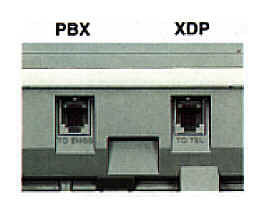
Since digital phones need only one pair of wires (two
individual wires twisted together) for full functioning on any number of lines, and no one
installs just one pair of wires, Panasonic’s digital phones direct the
normally-unused second pair to an additional jack on the back of each digital
phone.
This jack, called XDP ("eXtra Device
Port"), allows the instant connection of any single-line phone or device. But unlike
the situation with shared ports on analog systems, a phone or gadget plugged into an XDP can work on one line,
even when the base and handset of the "host" phone are being used on another
line.
This means, that without any additional wire, without any additonal jacks, without
any add-on modules or adapters, without any complex programming changes... any desk with a digital phone can instantly
accomodate a computer, a fax, an answerer, a credit card terminal or a cordless phone.
- If someone who does not normally use a PC, suddenly needs a
phone line connection for a modem, it’s ready in a few seconds, with ZERO equipment cost and ZERO installation
cost.
- If you need to use a fax machine or a credit card terminal
in an office where you just have a phone; it can be working in a few seconds with no additional cost.
Panasonic’s digital and analog phone systems
allow the easy connection of up to four
door intercom speaker boxes. A visitor at the door can
make your phones ring by just tapping a button, and you can speak to the visitor by just
answering a phone. If an electric "door strike" has been installed, you can
remotely unlock the door from any phone.
 There are dedicated circuits for the door intercom speakers. Unlike some other
phone system brands, if you use a door intercom with a Panasonic phone system, you do not reduce the number of phones or lines your system can
handle. There are dedicated circuits for the door intercom speakers. Unlike some other
phone system brands, if you use a door intercom with a Panasonic phone system, you do not reduce the number of phones or lines your system can
handle.
* There is usually some loss of speed, and the amount of
loss varies with the modem used. |

