AbleComm: Panasonic Phone Systems & Phones |
 |
|
||||
|
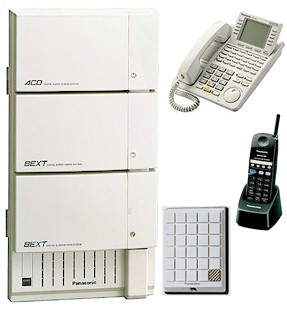
"Digital" has replaced "solid-state" as a favorite buzzword in electronics. The new technology has given us everything from PCs, compact discs and Hollywood special effects, to elaborate office telephones that use just two wires, instead of the four-to-100 wires that were previously required. This advance made life much easier for phone-installers, but didn't have much impact on phone-users -- digital phones just didn't seem very different from older analog phones, so there was little impetus to buy a digital system. And even though digital phones can work with just two wires, no one installs just two. The cost of extra wires is insignificant, a slightly thicker bundle is less likely to break during installation, and it's nice to have a spare if a wire gets damaged later on by a carpenter, plumber or squirrel. Those spare wires were often unused, until Panasonic thought up the "eXtra Device Port," and designed the "Digital Super Hybrid" phone systems it's part of. Abbreviated as "XDP," this new feature combines an extra jack on the back of a phone, with the extra wires in the wall, and provides a place to quickly connect an extra gadget that will work on one line, while its host phone uses another!
If you need a credit-card verifier, that, too, gets plugged in without paying for a technician's visit. Likewise for a fax machine, or an extra phone for a visitor, or an answering machine. An instantly-installed cordless phone can access all lines and intercom and voice mail. If you're away from your desk, your calls can be automatically forwarded to the cordless, or to any other phone, anywhere in the world. With fax/modems now more common than typewriters, your whole staff, or your family, can fax from their PCs. Just connect a modular phone cord from PC to the phone's XDP. The same cord and modem can also connect you to the Net, clients and suppliers. Several XDPs and modems make an instant Local Area Network ("LAN"). Without any new wire or jacks, the computers within your business or home can talk to each other over the system's intercom circuits. Programming the system is quite simple, from a PC or a display phone. The heart of the system is a central control unit ("KSU"), where the phones and phone lines get connected together. Panasonic manufactures three models. The KX-TD308 has a capacity of 3 lines, and 16 phones and accessories. The KX-TD816 has a capacity of 8 lines, and 32 phones and accessories. The KX-TD1232 can handle up to 12 lines with 64 phones and accessories. Huge homes and bigger businesses can link a pair of 1232s to double the capacity. Nine phone models are available, with different features and prices. They come in off-white or black, and work on table, desk or wall. Phone variations include alphanumeric displays, handsfree conversation, and 6, 12, or 24 "soft key" buttons. (Panasonic's older KX-T series analog phones will also work, and there's a new tiny 900MHz multi-line cordless.) Those buttons are used to select an outside line, to call someone inside or outside the business or home by just touching a button, and to activate features like paging or background music (from a tape, CD or radio feeding into the KSU). The buttons are illuminated, and you can use them to show when certain phones are in use. Receptionists can have "DSS/BLF" panels with instant intercom access and status indication for up to 128 people or departments.
Buttons near the screen are context-sensitive; their functions and your options change to reflect what you are doing, such as adjusting display screen contrast or searching for a phone number. The "Call Log" display of five most-recently-dialed numbers is a big time-saver on a short-term project where you are repeatedly calling several people, but don't need their numbers in permanent memory. It's also handy if you forgot to write down a phone number, and want to go back and see what number you dialed. The display can also show the date, time, number dialed, call duration, Caller ID, names of people calling you on intercom, alarm times, programming steps, messages from people who are away from their desks, and more. The 24 soft keys can be programmed to do whatever is important for a particular phone-user. Individual buttons can have access to groups of lines, freeing other buttons for other uses. You can easily automate intimidating processes, such as Call Forwarding to an answering service. The message-waiting system is logical and simple. If you call someone who doesn't answer, your screen might show "On Vacation Until Monday" or "Gone Home." To get a return call, just tap your message button to turn on the message light at the other phone. When the other person returns, she taps the illuminated message button, and instantly calls you. If you call someone within your business or home and get a busy signal and your call is urgent, you can talk through the other person's speaker by tapping a button. If your call can wait, press a button to "camp-on." When the other person is available, your phone will ring. When you answer, the other phone will ring and the two of you can talk. You can also camp-on to be notified when a certain line is free. If you call someone on the outside and get a busy signal, press REDIAL and the phone will keep trying the call for you, at selectable intervals ranging from three seconds to two minutes. A Panasonic digital Super Hybrid is even smart enough to remind you to call your broker at 3:15 this afternoon, or to take your pills before lunch every day. The system easily integrates with voice processing systems for voice mail and automated attendant service, and can even get extra work out of an inexpensive answering machine. One answerer can automatically respond to calls on one or some or even all lines, as an after-hours robotic receptionist. (In most business phone systems, the answerer is connected to the first line only.) An optional "DISA" module provides simplified automated attendant service, allowing two simultaneous callers to bypass a human receptionist to reach specific people or departments. The optional Caller ID circuit has a programmable data base, and can display both names and numbers on your phones, even if the local phone company transmits only a number but not a name. You can connect a printer to the KSU's serial port, or use a PC with call-accounting software, to maintain a record of who called whom when and how long they spoke; and assign account codes if you want to keep track of the time spent working for specific clients or on specific projects. When the system is first plugged in, all phones are private, but you can program some phones to have "Executive Busy Override" to barge-in on a conversation. Some phones can override the Override so no other executive can barge-in. "Data Line Security" will protect modems and faxes from glitches. You can program different phones to ring at different times of the day, and even select from eight ringing sounds, which is great if several businesses or departments share space, or if a system is used for home and business. Attractive door intercom boxes let you speak to a visitor or delivery truck driver by just answering a ringing phone -- even a cordless. You can unlock the door by tapping a button on the phone. A superb system and a very good value; highly recommended for business, home, or both! |

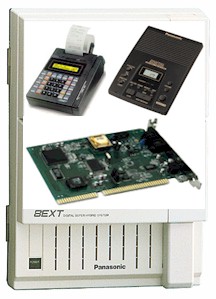 If you take your laptop computer to the office, and
there's no modem jack on the wall, just connect a cord from PC to XDP, and get to work.
If you take your laptop computer to the office, and
there's no modem jack on the wall, just connect a cord from PC to XDP, and get to work.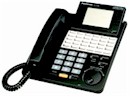 Panasonic's best digital phone is the KX-T7456, with
a 6-line back-lit pop-up LCD panel that displays directories of speed-dialing names and numbers,
and even the last five numbers you dialed. You can call anyone shown on the screen by just
tapping a button. Numbers in memory can be set to use specific lines, line groups, or any
available line.
Panasonic's best digital phone is the KX-T7456, with
a 6-line back-lit pop-up LCD panel that displays directories of speed-dialing names and numbers,
and even the last five numbers you dialed. You can call anyone shown on the screen by just
tapping a button. Numbers in memory can be set to use specific lines, line groups, or any
available line. |
|
|
|
|
|
| Call us toll-free, 1 888 ABLE 999 | |