(October, 1998)
First
impressions..."The good, the bad,
and the ugly."
It's now over four years since the debut of
Panasonic's KX-TD "Digital Super Hybrid" phone systems, and the KX-T7200-series
digital phones.
Four years is an eternity in electronics.
In four years, we've gone from seemingly-fast
486 PCs to really-fast Pentium IIs, from 14.4 modems to ADSL, from analog cordless phones
to digital spread spectrum, from bulky cellular phones to tiny PCS phones. And even
products that were once strictly sci-fi -- like HDTV, satellite TV, flat panel monitors,
voice typewriting and digital video recording -- are now available to any shopper.
In the past, when Panasonic came out with a
new phone, it immediately changed my opinion about the phone it replaced. A phone that had
seemed handsome, contemporary, and feature-rich...suddenly seemed hopelessly out-of-date.
This is not the case with the new 7400 series
phones. They have some nice new features, but there is simply no compelling reason to
replace all my phones, or to tell my customers they have to replace theirs.
However, I am definitely going to replace
some, and the beloved KX-T7235 on my desk is the first to go.
I really want a big display and 24
programmable buttons on the same phone. There are simply too many people and too many
functions for the 12 buttons I've had until now. It's tough to choose between one-touch
dialing to the ladies' bathroom and voicemail recording, between dial-a-joke and all-call
paging. Now I can have them all!
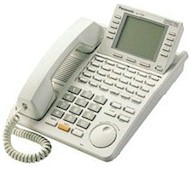
The big display on the new 7436 sticks up
straighter than my 7235's screen, so it's much easier to read on more parts of my desk,
with different lighting conditions.
The main difference between old and
new is the use of a "Jog-Dial" to control volume and display. This dial has
become common on video equipment and may turn out to be a terrific time saver for phone
users...or it may collect Coke and crud and freeze up. We'll soon find out.
It's ironic, that after about 30
years of touch-tone calling, my latest and greatest phone lets me make calls by rotating a
DIAL -- and it's faster than pushing buttons!
I can also change system programming by just
jogging through a list of program names, instead of searching though the manual.
Trying the Jog-Dial when it's not connected
to a new control unit can't possibly reveal how useful it is. It's WONDERFUL
to be able to scan through zillions of recorded speed-dial names, and all those
programming steps. When you find what you want, just tap a button. (STUPIDITY
ALERT: While in system programming, you turn the knob counter-clockwise to
reach higher numbers.)
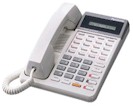
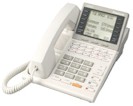
All three display phones can show speed-dial
names, not just the top-of-the-line model.
You can now have speakerphone on even the
least expensive phone in the series. You now have a HUGE
choice of phones for Panasonic digital systems -- 16 different multi-line models.
(Off-hook call-announce is available only in the top-of-the-line 7436).
With a phone programmed for whisper call
announcing, you can be told through your handset that another caller wants you, without
the person you are speaking to hearing the announcement.
The new phones are priced the same as the old ones. You now get more for your money.
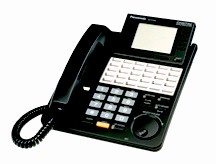 Now on Michael's desk... Now on Michael's desk...
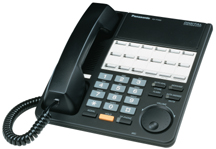
If you've been wanting a phone with a big display
screen, and a lot of buttons, the new KX-T7436 will make you very happy. It has a six-line
display like the KX-T7235, and 24 programmable buttons like the KX-T7230. Buttons can be
used to access 24 lines in a system using two KX-TD1232 control units, or for lots of
one-button dialing of intercom and outside calls. |
 ...and a phone for the doghouse. ...and a phone for the doghouse.
The new 12-button KX-T7420 and KX-T7431 phones are UGH-LEE! The space that would have been
used for additional buttons is used for bigger labels for the remaining buttons. This is
not very useful, and the phones look too wide. It's probably the worst bit of industrial
design since the 1974 Lancia Beta sedan. The real phones look worse than this picture.
They work fine. |
If you've been wanting a phone that could
provide easy operation with handset or headset or speakerphone, like
NorTel has, Panasonic
doesn't do it. A fairly-easy program step lets you choose headset and handset, or speaker
and handset, but not all three. BOO!
If you wanted
more phone choices, including display phones with 12 or 24 buttons, and 1,
2, 3, or 6 lines of displayed text, you now can choose them.
If you found it confusing to have two jacks
on the back of each 7200-series phone, you'll like the new phones better.
The jacks for connecting the handset cord and line cord have been moved to the bottom of
the phone, and the jack that connects to the main unit, is now labeled "TO MAIN
UNIT," instead of the cryptic "TO EMSS" on the older phones.
There is now just one jack on the back. It's
the famous XDP jack, but instead of being labeled "XDP," it still inexplicably
says "TO TEL," like the 7200 phones, and is guaranteed to confuse a bazillion
people. Incredibly stooooopid decision. The "XDP" label has
even been banished from the top of the phones. I wonder why.
I like
having the line cord connect on the bottom -- it will make wall-mounted phones look a lot
cleaner, without a cord looping over the top.
However, when a 7436 phone -- with the big
display -- is mounted on the wall, it looks a bit weird
(as if the display really doesn't belong there), because the display extends above the top
of the phone. It looks fine on a desk, where the display tilts upward for easy reading.
Having the handset cord come from the bottom
makes the phone look a little cleaner from the side. The new phones are supplied with a
new design in handset cords. The last few inches on one end are not coiled, so it's easier
to squeeze into a groove that goes across the bottom of the phone from the left side to
the handset jack.
This change provides a minor esthetic
improvement, but presents a major PITA for installers and users. Lots of
people won't notice that the handset cords are not the same at each end, and will waste
time trying to force the curly end into the groove. And if you need to install a headset
adapter, or a long cord, or an ordinary cord when the original cord dies, you'll waste
time un-twisting and squeezing. Also, from past experience, I can almost guarantee that
neither the special cords or ordinary cords will stay in the groove.
The touch-tone buttons on the new phones
look much more modern than those on the 7200
phones, and feel great, too. The buttons on both white and black phones are gray, with big
bold numbers. The letters are printed above the buttons. You'll even see "Q" and
"Z" above the "7" and "9" keys -- great
for programming names into the system.
The Incoming Call Log can be locked, so no
one can see which callers you spoke to.
With the 7400 series, at last we now have a
mute control that mutes the handsfree microphone, AND the handset's microphone. This has
been a shortcoming of Panasonic's system phones for a decade, and I am thrilled to stop complaining about it.
Some annoying shortcomings of the 7200
series have not been fixed.
As mentioned above, you can't easily use
both a headset and a speakerphone. If you are using a headset but don't
keep it on all the time, shut off the intercom
Auto-Answer feature so your phone will ring, otherwise you might miss an intercom call.
Displays are still English/French bilingual
-- great for Canada but useless for a growing number of Spanish-speaking Americans.
Panasonic's American-market consumer phones have had Spanish manuals and Spanish text on
the packages for years, but the business phone systems are not Latino-friendly. If Jose in
Los Angeles or Tomas in Nueva York can buy $89 Panasonic cordless phones for their homes
that have instructions in Spanish and English, the big-buck phone systems they use at work
should be similarly accommodating.
Even though Panasonic is now building duplex
speakerphone circuits into relatively inexpensive consumer phones, the 7400-series
speakerphones are not duplex. Only one person can talk at a time. You have to be polite.
Caller ID info on un-answered calls is
automatically logged at just one phone (but can be manually logged at any phone). We can
get automatic logging of ALL calls on a house full of $20 CID displays, but not in an
office with a $10,000 phone system. Panasonic's explanation is that if un-answered calls
were displayed on multiple phones, someone might return a call that had already been
returned by someone else. That's not a great tragedy, and lots of people want multiple
appearances of the incoming log, so we should at least have the option. Maybe some day
we'll have interaction between the display and voicemail, so I can look at a list of
recent callers on my phone's screen or PC screen, and select names or numbers to hear the
messages I think are most important.
The dash-three systems can't handle Caller
ID on Call-Waiting. Panasonic consumer phones can do it. Most business users don't care
about Call-Waiting, but Panasonic is increasingly aiming its phone system marketing at
residential and home/office customers, where CID/CW is important and is expected.
Here's a general design principle
that makers of expensive and elaborate products of any kind, should keep in mind: people don't expect to have less convenience when they spend more money!
Panasonic pioneered auto-busy-redial on consumer phones, but it was not available on their
phone systems for about five years. It has taken us about ten years to get a simple
handset mute on system phones. A basic function of cheap CID displays is not available in
what is now the fourth generation of "CID-ready" control units.
...Uncle Mikey
 |
|
 Home Email
ORDER ONLINE
Home Email
ORDER ONLINE