|
Panasonic’s
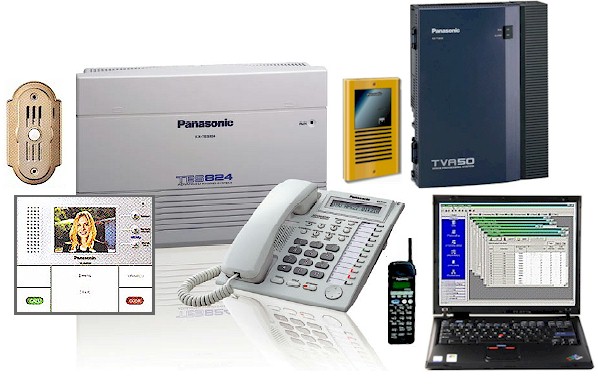
KX-TA624 has been an extremely popular residential and small
business phone system, with a wealth of features, easy
installation, high quality, and good value.
After seven
years and dozens of improvements, Panasonic has replaced it with the
new KX-TA824; with greater capacity, easier installation, more
features, and -- since the quality and price are the same – even
greater value.
 Like the
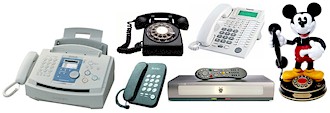
KX-TA624, the KX-TA824 is a “hybrid”
design allowing you to connect either Panasonic
proprietary telephones, or single-line phones and gadgets (fax,
TiVo, modem, etc.) to any phone jack in the system, without special
hardware. Like the
KX-TA624, the KX-TA824 is a “hybrid”
design allowing you to connect either Panasonic
proprietary telephones, or single-line phones and gadgets (fax,
TiVo, modem, etc.) to any phone jack in the system, without special
hardware.
You can save
money by using an ordinary $20 single-line phone in less important
places like the garage or attic; or where you want to keep things
simple, like the guest room (no need to explain all the buttons to
grandma).
You can also
take advantage of this flexibility to let a child or wife keep using
a favorite “decorator” phone or novelty phone, when you upgrade from
having just a bunch of phones to a real phone system. (With some
other systems, if you want to use a $20 phone instead of a $200
phone, you need to get a $200 adapter. Goodbye savings.)
The KX-TA824
is the first Panasonic phone system to offer
three voice mail options:
| #1 |
 |
Like the
recently-discontinued Panasonic KX-TA308, you can
use telephone company
voice mail. Each outside line can have a
voice mailbox, and calls can be answered by the
telco’s robot even when your lines are busy.
When a message
is waiting, a light will let you know; and you’ll
hear a “stutter” dial tone when you access a phone
line. You'll probably pay $5 - $10 per line per
month for this. |
|
| |
| #2 |
 |
If you want
mailboxes for individual people rather than phone
lines, and don’t feel like enriching SBC or Verizon
any more than necessary, you can use Panasonic’s
optional “in-skin”
voice mail circuit card.
It provides up to
60 minutes of high quality recording time, and gives
each phone a personal mailbox that can be customized
to greet callers. |
|
- When a message is
waiting, the message light on a Panasonic proprietary
telephone will be activated and the message can be
played by tapping the message button. Single-line phone
users are notified of waiting messages with a stutter
dial tone.
- With this internal
voicemail, installation takes just a few minutes and no
phone ports are used, so you don’t lose any capacity.
- If you don’t want
to have individual mailboxes, you can have one “master
mailbox” for the whole family to share, like an ancient
answering machine.
- You can't transfer
a call directly to someone else's voice mailbox
like you can with an external voice processor. As on
Panasonic's KX-TG4000 wireless system, you can transfer
a call to a phone, and if it is busy or unanswered, it
will then be forwarded to its mail box. If you are using
the system in a business, and someone will be away, his
or her phone should be programmed to FORWARD ALL CALLS
to voice mail, to save time by not ringing the phone
before the call goes to voice mail.
- Unlike Panasonic's
external voice processors, the built-in voice mail
system does not provide vocal user prompts, but because
it is so well integrated with the 824, it does provide
information and instructions on the phone displays. If
you call someone else's mailbox to leave a message, for
example, your screen will show "Please Wait" and then
"Now Recording."
|
| #3 |
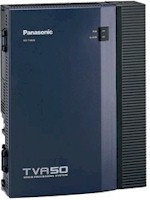 |
| If you
require a more fully featured voice mail
system with auto attendant, the KX-TA824 can
be connected to a Panasonic
voice processing
system, such as the KX-TVS50 or
new
KX-TVA50.
A “VPS” provides many more
features than the in-skin circuit, plus more
mailboxes and more recording time. It also
decreases the number of phones you can use,
and costs more money; but it could be a much
better choice than in-skin or telco voice
mail, particularly if it serves both a
business and a family. |
|
|
| |
|
|
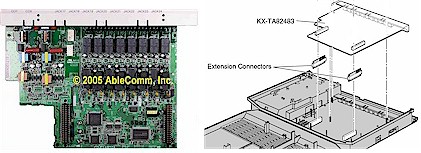
Out
of the box, the KX-TA824 supports three outside lines and eight
phones (3X8 configuration). Up to two additional circuit boards can
be installed, for a maximum system capacity of
eight lines and 24 phones.
|
 |
The 8 x 24
size has not previously been available in Panasonic KX-T systems,
and makes the 824 particularly well-suited for serving your home and
your business, if the business is at home.
The system is
almost organic, in how it can evolve with your family’s needs. If
you have young children, their phones could stop ringing at 7 or 8
pm. If you have college-age kids, you can allow their phones to ring
at any time of night, but program the phones in the master bedroom
to not ring after 11.
You can also
program which lines ring where, so business calls don’t ring in the
playroom, kids’ calls don’t ring in the office, and no calls ring in
the home theater.
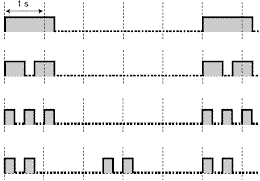 At
proprietary phones where different kinds of calls ring,
you can program different ringing patterns, such as a single ring
for kids, a double ring for parents, and a triple ring for business.
If you do this, no one will waste time running to answer a phone,
only to find it's for someone else when they see which light is
flashing. At
proprietary phones where different kinds of calls ring,
you can program different ringing patterns, such as a single ring
for kids, a double ring for parents, and a triple ring for business.
If you do this, no one will waste time running to answer a phone,
only to find it's for someone else when they see which light is
flashing.
The door
intercoms produce the same ringing patterns, but you can connect
door chimes, bells or other
signals, and they can be programmed to ring with different patterns. Phone displays will show
“Door 1,” “Door 2,” etc.
The new system
can handle ordinary analog phone lines, as well as VoIP. It will
also work with phone company distinctive ringing service; but since
it does not have ring decoding built-in, you will need a “ring
detector” ahead of the 824.
 |
|
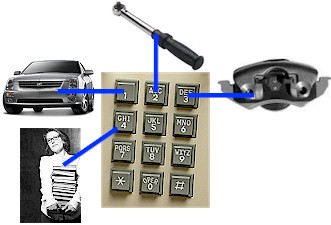 |
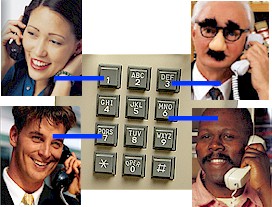
| The 824 has a
built-in three-level auto attendant,
making it easer to find a person, with pre-recorded menus like
“Press one for Sally, press three for Steve.” |
|
A business, such as a car dealership,
could offer departmental choices such as "Press one for
sales, press two for service, press three for parts, press
four for information. |
| |
|
| The three levels allows
you to structure a menu offering more specific choices as
callers get "deeper."
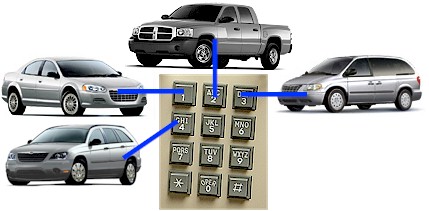
For example, at the car
dealership, if a caller pressed one for sales, the next
level might allow a choice of cars, trucks, minivans or
SUVs.
The third level, within
each vehicle type, could allow a choice of new or used
vehicles. |
 |
Voice quality
is as good as a big-buck corporate system, so you won't be
misunderstood or be embarrassed; and since the feature is on the motherboard,
installation time is zero
minutes and the cost to you is zilch.
A less-useful DISA module for the old 624 usually cost $200-$400.
The built-in auto-attendant can handle one call at a time (“one
port”) and has three minutes of recording time. An add-on circuit
card will give you another port, and three more minutes. A home can
probably get by with just the built-in. If you have a business, get
the extra card.
The internal
auto-attendant function is part of a feature package that Panasonic
calls "DISA" (Direct Inward System Access),
which provides a number of additional functions (but they may not be
particularly useful to you):
-
Fax detection -- If you get
relatively little fax traffic, a phone line can be shared by
human beings and your fax machine. When a call comes in, the
DISA robot answers; and if she hears a "CNG" tone that
identifies an incoming fax, the call is directed to your fax
machine. If she doesn't hear a CNG tone, DISAbot assumes
that the call is coming from a human being, and the caller will
hear a menu, and tap buttons to reach a person or department.
This works fine in a business where automated attendants are
common and most people stay at their desks, but can be a
PITA in a home where people move around. If you don't want to
use auto attendant, but do want a line to be shared by fax and
people, get an
automatic fax/voice switch.
-
U-Turn phone call -- Designated
employees or family members can call in on one of your lines and
call out on another, to take advantage of low-cost long distance
service you may have. This is less important than it used to be,
because many people have unlimited nearly free long distance
service, particularly on cell phones. If you set up this
feature, be sure to protect it with a password, or you may find
an expensive surprise on your phone bill.
 In
addition to displaying Caller ID name and number on a Panasonic
proprietary telephone, the KX-TA824 can also send
Caller ID to single-line telephones,
PCs, or Caller ID display accessories. In
addition to displaying Caller ID name and number on a Panasonic
proprietary telephone, the KX-TA824 can also send
Caller ID to single-line telephones,
PCs, or Caller ID display accessories.
Other
Panasonic systems either couldn’t do this at all, or could do it for
just one phone, or required an extra-cost circuit board to do it.
With the 824, the feature costs you
nada.
The 824 has
sockets for up to three miniature 3-line Caller ID cards. The first
card is a freebie,
pre-installed at the factory, saving
you over a hundred bucks. As Elvis used to say, “Thank
you very much.”
You also get
Caller ID on Call Waiting ("Type
2"), which was not available on the more expensive KX-TD systems.
The Caller ID log works like
recent versions of the KX-TA624, and better than on KX-TD or KX-TDA
or KX-TAW systems. You can program the 824 to log all calls into a
common log that can be viewed at any display phone, and it can log
both answered and unanswered calls.
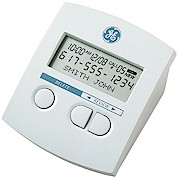
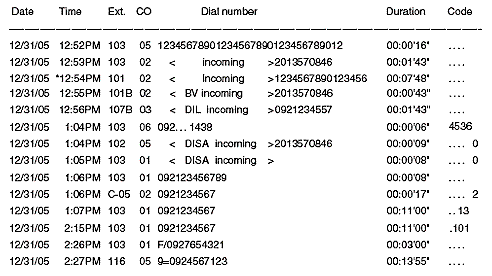
You can also
plug in a Caller ID display box (often free from your phone
company), or connect a PC for a detailed
record of all calls, in and out ("SMDR").
The KX-TA824
is extremely easy to install, with simple modular jacks for dialtone
and phones. I recommend a 2’ x 4’ piece of 5/8” plywood mounted
horizontally, at eye level, to hold the 824 and add-ons.
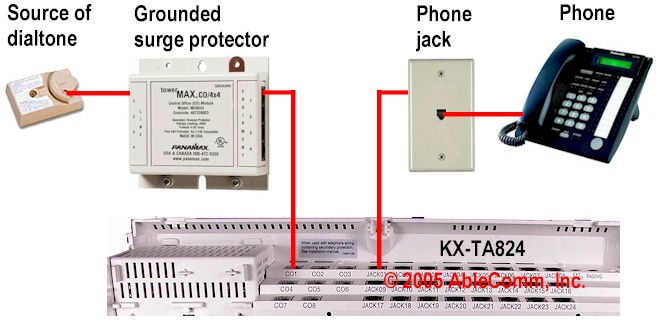
Don’t forget
surge protection, for both phone lines and AC power. ITW Linx has
recently taken over the PanaMax phone system product line, and their
stuff is very good.
Unlike some
TVs, the KX-TA824 will work right out of the box with no programming
at all. However, you’ll probably prefer that the displays show the
correct time and date; and you have four
programming options:
- You can
program the 824 with a proprietary display phone. The
KX-T7736 or older 7735 are the best choices, because of their
big displays, but you can also use other models, like a
KX-T7030.
- Use a PC
through the DB9 serial port.
- Use a PC
through the USB
port.
- Use a PC
remotely by PC through the
system's built-in remote programming modem.
With other
Panasonic systems, a programming modem costs hundreds of bucks. With
the 824, the modem is on the motherboard; so again, installation
time is zero minutes, and
the cost to you is gornicht.
And if that’s
not enough free stuff to get you salivating, you also get terrific
Windows software, for nutten, honey.
Panasonic software for the KX-TD816 and 1232 costs nearly $300.
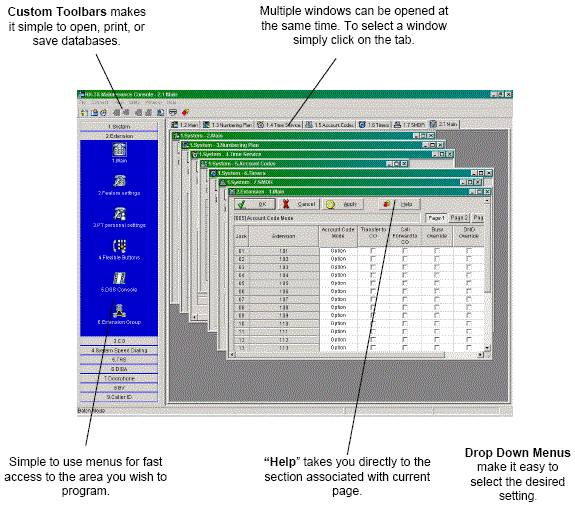
Your system's custom programming can be saved on a PC for backup and
restore. The USB and serial ports can be live at the same time,
permitting simultaneous programming, and logging for call
accounting.
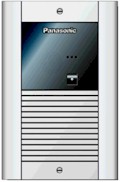 The
new system supports up to four door lock controls (or remote gate
openers) and four door intercom speakers. The
new system supports up to four door lock controls (or remote gate
openers) and four door intercom speakers.
Panasonic has
two new families of door intercom
speakers: audio only with optional brass or silvery metal finishes
and a sexy blue “find me” LED; and audio plus video, to let you see
if the person at the door is kindly Aunt Edna or the Boston
Strangler.
Of course, you
also get phone-to-phone intercom,
and you can make an announcement (“Supper’s ready!”) through the
speakers in all of the phones if your press Intercom, 330 or press a
pre-programmed button.
If you want to
have a conversation, say "(name)
call 43." When the other person picks up the phone and dials 43, the
two of you will be connected in a private conversation, and all of
the speakers in the other phones will be shut off.
On a new
KX-TA824 installation, you’ll probably use Panasonic’s excellent
KX-T7700 series proprietary phones. On an upgrade, you can also use
older phones, particularly the KX-T7000 series models. The new 7700s
are nicer, can have displays that show three lines of text, and have
money-saving, space-saving built-in 2.5mm headset jacks.
Unfortunately, their output level is a bit low, but AbleComm has
high-output
monaural and binaural headsets to solve the problem.
 Even
if you are not going to use Caller ID, you will miss a lot of
convenience if you don't get display
phones. They're very important for use with the built-in
voice mail, system speed dialing, and for programming features in
individual phones. In any location where you want to see Caller ID,
the KX-T7736 is a better choice than the KX-T7731, because the
bigger display can show both name and number at the same time. In
places where you don’t need displays, you can save money by getting
the KX-T7720. Don’t bother considering the KX-T7750 “monitor”
phone. It’s a lot less convenient than the other models because it
lacks a microphone, but the dollar savings are insignificant, unless
you need hundreds of phones. Even
if you are not going to use Caller ID, you will miss a lot of
convenience if you don't get display
phones. They're very important for use with the built-in
voice mail, system speed dialing, and for programming features in
individual phones. In any location where you want to see Caller ID,
the KX-T7736 is a better choice than the KX-T7731, because the
bigger display can show both name and number at the same time. In
places where you don’t need displays, you can save money by getting
the KX-T7720. Don’t bother considering the KX-T7750 “monitor”
phone. It’s a lot less convenient than the other models because it
lacks a microphone, but the dollar savings are insignificant, unless
you need hundreds of phones.
The
feature list is endless, and we don't have endless space,
so here are a few more items to entice and excite you: music-on-hold
input, built-in on-hold reminder tone, paging output, account codes,
automatic redial of busy numbers, conference calls, DSS console,
electronic phone lock, exclusive hold, room monitor (great for
checking on babies or spying on employees), power failure transfer,
class of service, timed reminder (wake up at six or take a pill at
ten), away from phone text messages,
background music, flexible buttons, "this-extension" number display,
extension groups (press one button to ring a group of people).
The 824 is supplied
with four
paper manuals and a CD-ROM.
The FEATURE MANUAL is the most important, because it tells you what
the system can do, and refers you to pages and sections in the other
books. The OPERATING MANUAL
is the second most important, because it tells you how to do the
things that are listed in the Feature Manual.
The printed books may
be more convenient to use than the CD-ROM, but the CD-ROM may be
more up-to-date.
The CD-ROM gives you a much bigger
image to read on a PC screen, than the small printed books; so you
may want to print some pages on 8-1/2 x 11 paper. If you want to
work from the CD-ROM, copy it onto your hard drive. You'll be able
to access the PDF files much faster than if you have to keep reading
from the CD-ROM.
LOOK CAREFULLY:
It can be hard to find things. If you want info on telephone company
voicemail, you don't look under V or T or P or C in the index. It's
in the L section, for "local carrier-based voice mail service." When
you find important pages, bookmark them with little plastic Post-It
Notes. You may want to add some of your own notes, too, as you make
discoveries. For example, the programming manual skips over some
“secret programs," such as #113 and 114, which set auto-busy-redial.
WATCH YOUR LANGUAGE:
When the manuals talk about a “pager,” they don't mean a beeper you
clip to your belt. They mean a paging system ("public address"
system). Panasonic has kept this bit of stupidity through many
generations of manuals, and will probably never fix it.
IN CONCLUSION:
Despite a few lapses in documentation language and organization, the
KX-TA824 is an extremely good phone system, and a fine choice for
just about any home, and many businesses.
Since the value of the
FREE auto attendant, FREE Caller ID circuit, FREE Caller ID on
single-line phones circuit, FREE remote programming
modem, and FREE software, is more than twice the price of the 824,
it’s like getting the 824 for FREE… and that’s hard to beat.
I don't know of any other system
that gives you so much, for such a low price; and many other systems
do less and cost more. Panasonic has set a new standard for phone
systems in the 824 size range, and it will be very difficult for
other manufacturers to catch up.
/mnm |